From Surf Wiki (app.surf) — the open knowledge base
MATLAB
Numerical computing environment and programming language
Numerical computing environment and programming language
| Field | Value |
|---|---|
| name | MATLAB (software) |
| logo | Matlab Logo.png |
| logo size | 150px |
| logo caption | L-shaped membrane logo |
| caption | MATLAB R2015b running on Windows 10 |
| developer | MathWorks |
| released | |
| latest release version | |
| latest release date | |
| latest preview version | |
| programming language | C/C++, MATLAB |
| operating system | Windows, macOS, and Linux |
| platform | IA-32, x86-64, ARM64 |
| genre | Numerical computing |
| license | Proprietary commercial software |
| website |
- APL
- EISPACK
- Fortran
- LINPACK
- PL/0
- Speakeasy
- Julia
- Octave
- Scilab
MATLAB (Matrix Laboratory) is a proprietary multi-paradigm programming language and numeric computing environment developed by MathWorks. MATLAB allows matrix manipulations, plotting of functions and data, implementation of algorithms, creation of user interfaces, and interfacing with programs written in other languages.
Although MATLAB is intended primarily for numeric computing, an optional toolbox uses the MuPAD symbolic engine allowing access to symbolic computing abilities. An additional package, Simulink, adds graphical multi-domain simulation and model-based design for dynamic and embedded systems.
, MATLAB has more than four million users worldwide. They come from various backgrounds of engineering, science, and economics. , more than 5000 global colleges and universities use MATLAB to support instruction and research.
History
Origins
MATLAB was invented by mathematician and computer programmer Cleve Moler. The idea for MATLAB was based on his 1960s PhD thesis. Moler became a math professor at the University of New Mexico and started developing MATLAB for his students as a hobby. He developed MATLAB's initial linear algebra programming in 1967 with his one-time thesis advisor, George Forsythe. This was followed by Fortran code for linear equations in 1971.
Before version 1.0, MATLAB "was not a programming language; it was a simple interactive matrix calculator. There were no programs, no toolboxes, no graphics. And no ODEs or FFTs."
The first early version of MATLAB was completed in the late 1970s. The software was disclosed to the public for the first time in February 1979 at the Naval Postgraduate School in California. Early versions of MATLAB were simple matrix calculators with 71 pre-built functions. At the time, MATLAB was distributed for free to universities. Moler would leave copies at universities he visited and the software developed a strong following in the math departments of university campuses.
In the 1980s, Cleve Moler met John N. Little. They decided to reprogram MATLAB in C and market it for the IBM desktops that were replacing mainframe computers at the time. John Little and programmer Steve Bangert re-programmed MATLAB in C, created the MATLAB programming language, and developed features for toolboxes.
Commercial development
MATLAB was first released as a commercial product in 1984 at the Automatic Control Conference in Las Vegas. MathWorks, Inc. was founded to develop the software and the MATLAB programming language was released. The first MATLAB sale was the following year, when Nick Trefethen from the Massachusetts Institute of Technology bought ten copies.
By the end of the 1980s, several hundred copies of MATLAB had been sold to universities for student use. The software was popularized largely thanks to toolboxes created by experts in various fields for performing specialized mathematical tasks. Many of the toolboxes were developed as a result of Stanford students that used MATLAB in academia, then brought the software with them to the private sector.
Over time, MATLAB was re-written for early operating systems created by Digital Equipment Corporation, VAX, Sun Microsystems, and for Unix PCs. Version 3 was released in 1987. The first MATLAB compiler was developed by Stephen C. Johnson in the 1990s.
In 2000, MathWorks added a Fortran-based library for linear algebra in MATLAB 6, replacing the software's original LINPACK and EISPACK subroutines that were in C. MATLAB's Parallel Computing Toolbox was released at the 2004 Supercomputing Conference and support for graphics processing units (GPUs) was added to it in 2010.
Recent history
Some especially large changes to the software were made with version 8 in 2012. The user interface was reworked and Simulink's functionality was expanded.
By 2016, MATLAB had introduced several technical and user interface improvements, including the MATLAB Live Editor notebook, and other features.
Release history
For a complete list of changes of both MATLAB an official toolboxes, check MATLAB previous releases.
| Name of release | MATLAB | Simulink, Stateflow (MATLAB attachments) | Year | Volume 8 | Volume 9 | R9.1 | R10 | R10.1 | R11 | R11.1 | R12 | R12.1 | R13 | R13SP1 | R13SP2 | R14 | R14SP1 | R14SP2 | R14SP3 | R2006a | R2006b | R2007a | R2007b | R2008a | R2008b | R2009a | R2009b | R2010a | R2010b | R2011a | R2011b | R2012a | R2012b | R2013a | R2013b | R2014a | R2014b | R2015a | R2015b | R2016a | R2016b | R2017a | R2017b | R2018a | R2018b | R2019a | R2019b | R2020a | R2020b | R2021a | R2021b | R2022a | R2022b | R2023a | R2023b | R2024a | R2024b | R2025a | R2025b |
|---|---|---|---|---|---|---|---|---|---|---|---|---|---|---|---|---|---|---|---|---|---|---|---|---|---|---|---|---|---|---|---|---|---|---|---|---|---|---|---|---|---|---|---|---|---|---|---|---|---|---|---|---|---|---|---|---|---|---|---|
| 5.0 | 1996 | ||||||||||||||||||||||||||||||||||||||||||||||||||||||||||
| 5.1 | 1997 | ||||||||||||||||||||||||||||||||||||||||||||||||||||||||||
| 5.1.1 | 1997 | ||||||||||||||||||||||||||||||||||||||||||||||||||||||||||
| 5.2 | 1998 | ||||||||||||||||||||||||||||||||||||||||||||||||||||||||||
| 5.2.1 | 1998 | ||||||||||||||||||||||||||||||||||||||||||||||||||||||||||
| 5.3 | 1999 | ||||||||||||||||||||||||||||||||||||||||||||||||||||||||||
| 5.3.1 | 1999 | ||||||||||||||||||||||||||||||||||||||||||||||||||||||||||
| 6.0 | 2000 | ||||||||||||||||||||||||||||||||||||||||||||||||||||||||||
| 6.1 | 2001 | ||||||||||||||||||||||||||||||||||||||||||||||||||||||||||
| 6.5 | 2002 | ||||||||||||||||||||||||||||||||||||||||||||||||||||||||||
| 6.5.1 | 2003 | ||||||||||||||||||||||||||||||||||||||||||||||||||||||||||
| 6.5.2 | |||||||||||||||||||||||||||||||||||||||||||||||||||||||||||
| 7 | 6.0 | 2004 | |||||||||||||||||||||||||||||||||||||||||||||||||||||||||
| 7.0.1 | 6.1 | ||||||||||||||||||||||||||||||||||||||||||||||||||||||||||
| 7.0.4 | 6.2 | 2005 | |||||||||||||||||||||||||||||||||||||||||||||||||||||||||
| 7.1 | 6.3 | ||||||||||||||||||||||||||||||||||||||||||||||||||||||||||
| 7.2 | 6.4 | 2006 | |||||||||||||||||||||||||||||||||||||||||||||||||||||||||
| 7.3 | 6.5 | ||||||||||||||||||||||||||||||||||||||||||||||||||||||||||
| 7.4 | 6.6 | 2007 | |||||||||||||||||||||||||||||||||||||||||||||||||||||||||
| 7.5 | 7.0 | ||||||||||||||||||||||||||||||||||||||||||||||||||||||||||
| 7.6 | 7.1 | 2008 | |||||||||||||||||||||||||||||||||||||||||||||||||||||||||
| 7.7 | 7.2 | ||||||||||||||||||||||||||||||||||||||||||||||||||||||||||
| 7.8 | 7.3 | 2009 | |||||||||||||||||||||||||||||||||||||||||||||||||||||||||
| 7.9 | 7.4 | ||||||||||||||||||||||||||||||||||||||||||||||||||||||||||
| 7.10 | 7.5 | 2010 | |||||||||||||||||||||||||||||||||||||||||||||||||||||||||
| 7.11 | 7.6 | ||||||||||||||||||||||||||||||||||||||||||||||||||||||||||
| 7.12 | 7.7 | 2011 | |||||||||||||||||||||||||||||||||||||||||||||||||||||||||
| 7.13 | 7.8 | ||||||||||||||||||||||||||||||||||||||||||||||||||||||||||
| 7.14 | 7.9 | 2012 | |||||||||||||||||||||||||||||||||||||||||||||||||||||||||
| 8.0 | 8.0 | ||||||||||||||||||||||||||||||||||||||||||||||||||||||||||
| 8.1 | 8.1 | 2013 | |||||||||||||||||||||||||||||||||||||||||||||||||||||||||
| 8.2 | 8.2 | ||||||||||||||||||||||||||||||||||||||||||||||||||||||||||
| 8.3 | 8.3 | 2014 | |||||||||||||||||||||||||||||||||||||||||||||||||||||||||
| 8.4 | 8.4 | ||||||||||||||||||||||||||||||||||||||||||||||||||||||||||
| 8.5 | 8.5 | 2015 | |||||||||||||||||||||||||||||||||||||||||||||||||||||||||
| 8.6 | 8.6 | ||||||||||||||||||||||||||||||||||||||||||||||||||||||||||
| 9.0 | 8.7 | 2016 | |||||||||||||||||||||||||||||||||||||||||||||||||||||||||
| 9.1 | 8.8 | ||||||||||||||||||||||||||||||||||||||||||||||||||||||||||
| 9.2 | 8.9 | 2017 | |||||||||||||||||||||||||||||||||||||||||||||||||||||||||
| 9.3 | 9.0 | ||||||||||||||||||||||||||||||||||||||||||||||||||||||||||
| 9.4 | 9.1 | 2018 | |||||||||||||||||||||||||||||||||||||||||||||||||||||||||
| 9.5 | 9.2 | ||||||||||||||||||||||||||||||||||||||||||||||||||||||||||
| 9.6 | 9.3 | 2019 | |||||||||||||||||||||||||||||||||||||||||||||||||||||||||
| 9.7 | 10.0 | ||||||||||||||||||||||||||||||||||||||||||||||||||||||||||
| 9.8 | 10.1 | 2020 | |||||||||||||||||||||||||||||||||||||||||||||||||||||||||
| 9.9 | 10.2 | ||||||||||||||||||||||||||||||||||||||||||||||||||||||||||
| 9.10 | 10.3 | 2021 | |||||||||||||||||||||||||||||||||||||||||||||||||||||||||
| 9.11 | 10.4 | ||||||||||||||||||||||||||||||||||||||||||||||||||||||||||
| 9.12 | 10.5 | 2022 | |||||||||||||||||||||||||||||||||||||||||||||||||||||||||
| 9.13 | 10.6 | ||||||||||||||||||||||||||||||||||||||||||||||||||||||||||
| 9.14 | 10.7 | 2023 | |||||||||||||||||||||||||||||||||||||||||||||||||||||||||
| 23.2 | 23.2 | ||||||||||||||||||||||||||||||||||||||||||||||||||||||||||
| 24.1 | 24.1 | 2024 | |||||||||||||||||||||||||||||||||||||||||||||||||||||||||
| 24.2 | 24.2 | ||||||||||||||||||||||||||||||||||||||||||||||||||||||||||
| 25.1 | 25.1 | 2025 | |||||||||||||||||||||||||||||||||||||||||||||||||||||||||
| 25.2 | 25.2 |
Syntax
The MATLAB application is built around the MATLAB programming language.
Common usage of the MATLAB application involves using the "Command Window" as an interactive mathematical shell or executing text files containing MATLAB code.
"Hello, world!" example
An example of a "Hello, world!" program exists in MATLAB.
disp('Hello, world!')It displays like so:
Hello, world!Variables
Variables are defined using the assignment operator, =.
MATLAB is a weakly typed programming language because types are implicitly converted. It is an inferred typed language because variables can be assigned without declaring their type, except if they are to be treated as symbolic objects, and that their type can change.
Values can come from constants, from computation involving values of other variables, or from the output of a function.
For example:
>> x = 17
x =
 17

>> x = 'hat'
x =
hat

>> x = [3*4, pi/2]
x =
   12.0000    1.5708

>> y = 3*sin(x)
y =
   -1.6097    3.0000
Vectors and matrices
A simple array is defined using the colon syntax: initial:increment:terminator. For instance:
>> array = 1:2:9
array =
 1 3 5 7 9
defines a variable named array (or assigns a new value to an existing variable with the name array) which is an array consisting of the values 1, 3, 5, 7, and 9. That is, the array starts at 1 (the initial value), increments with each step from the previous value by 2 (the increment value), and stops once it reaches (or is about to exceed) 9 (the terminator value).
The increment value can actually be left out of this syntax (along with one of the colons), to use a default value of 1.
>> ari = 1:5
ari =
 1 2 3 4 5
assigns to the variable named ari an array with the values 1, 2, 3, 4, and 5, since the default value of 1 is used as the increment.
Indexing is one-based, which is the usual convention for matrices in mathematics, unlike zero-based indexing commonly used in other programming languages such as C, C++, and Java.
Matrices can be defined by separating the elements of a row with blank space or comma and using a semicolon to separate the rows. The list of elements should be surrounded by square brackets []. Parentheses () are used to access elements and subarrays (they are also used to denote a function argument list).
>> A = [16, 3, 2, 13  ; 5, 10, 11, 8 ; 9, 6, 7, 12 ; 4, 15, 14, 1]
A =
 16  3  2 13
  5 10 11  8
  9  6  7 12
  4 15 14  1

>> A(2,3)
ans =
 11
Sets of indices can be specified by expressions such as 2:4, which evaluates to [2, 3, 4]. For example, a submatrix taken from rows 2 through 4 and columns 3 through 4 can be written as:
>> A(2:4,3:4)
ans =
 11 8
 7 12
 14 1
A square identity matrix of size n can be generated using the function eye, and matrices of any size with zeros or ones can be generated with the functions zeros and ones, respectively.
>> eye(3,3)
ans =
 1 0 0
 0 1 0
 0 0 1

>> zeros(2,3)
ans =
 0 0 0
 0 0 0

>> ones(2,3)
ans =
 1 1 1
 1 1 1
Transposing a vector or a matrix is done either by the function transpose or by adding dot-prime after the matrix (without the dot, prime will perform conjugate transpose for complex arrays):
>> A = [1 ; 2],  B = A.', C = transpose(A)
A =
     1
     2
B =
     1     2
C =
     1     2

>> D = [0, 3 ; 1, 5], D.'
D =
     0     3
     1     5
ans =
     0     1
     3     5
Most functions accept arrays as input and operate element-wise on each element. For example, mod(2*J,n) will multiply every element in J by 2, and then reduce each element modulo n. MATLAB does include standard for and while loops, but (as in other similar applications such as APL and R), using the vectorized notation is encouraged and is often faster to execute. The following code, excerpted from the function magic.m, creates a magic square M for odd values of n (MATLAB function meshgrid is used here to generate square matrices I and J containing ):
[J,I] = meshgrid(1:n);
A = mod(I + J - (n + 3) / 2, n);
B = mod(I + 2 * J - 2, n);
M = n * A + B + 1;
Structures
MATLAB supports structure data types. Since all variables in MATLAB are arrays, a more adequate name is "structure array", where each element of the array has the same field names. In addition, MATLAB supports dynamic field names (field look-ups by name, field manipulations, etc.).
Functions
When creating a MATLAB function, the name of the file should match the name of the first function in the file. Valid function names begin with an alphabetic character, and can contain letters, numbers, or underscores. Variables and functions are case sensitive. rgbImage = imread('ecg.png'); grayImage = rgb2gray(rgbImage); % for non-indexed images level = graythresh(grayImage); % threshold for converting image to binary, binaryImage = im2bw(grayImage, level); % Extract the individual red, green, and blue color channels. redChannel = rgbImage(:, :, 1); greenChannel = rgbImage(:, :, 2); blueChannel = rgbImage(:, :, 3); % Make the black parts pure red. redChannel(~binaryImage) = 255; greenChannel(~binaryImage) = 0; blueChannel(~binaryImage) = 0; % Now recombine to form the output image. rgbImageOut = cat(3, redChannel, greenChannel, blueChannel); imshow(rgbImageOut);
Function handles
MATLAB supports elements of lambda calculus by introducing function handles, or function references, which are implemented either in .m files or anonymous/nested functions.
Classes and object-oriented programming
MATLAB supports object-oriented programming including classes, inheritance, virtual dispatch, packages, pass-by-value semantics, and pass-by-reference semantics. However, the syntax and calling conventions are significantly different from other languages. MATLAB has value classes and reference classes, depending on whether the class has handle as a super-class (for reference classes) or not (for value classes).
Method call behavior is different between value and reference classes. For example, a call to a method:
object.method();can alter any member of object only if object is an instance of a reference class, otherwise value class methods must return a new instance if it needs to modify the object.
An example of a simple class is provided below:
classdef Hello
    methods
        function greet(obj)
            disp('Hello!')
        end
    end
end
When put into a file named hello.m, this can be executed with the following commands:
>> x = Hello();
>> x.greet();
Hello!
Graphics and graphical user interface programming
{ "version": 2, "width": 400, "height": 200, "data": [ { "name": "table", "values": [ { "x": 3, "y": 1 }, { "x": 1, "y": 3 }, { "x": 2, "y": 2 }, { "x": 3, "y": 4 } ] } ], "scales": [ { "name": "x", "type": "ordinal", "range": "width", "zero": false, "domain": { "data": "table", "field": "x" } }, { "name": "y", "type": "linear", "range": "height", "nice": true, "domain": { "data": "table", "field": "y" } } ], "axes": [ { "type": "x", "scale": "x" }, { "type": "y", "scale": "y" } ], "marks": [ { "type": "rect", "from": { "data": "table" }, "properties": { "enter": { "x": { "scale": "x", "field": "x" }, "y": { "scale": "y", "field": "y" }, "y2": { "scale": "y", "value": 0 }, "fill": { "value": "steelblue" }, "width": { "scale": "x", "band": "true", "offset": -1 } } } } ] }
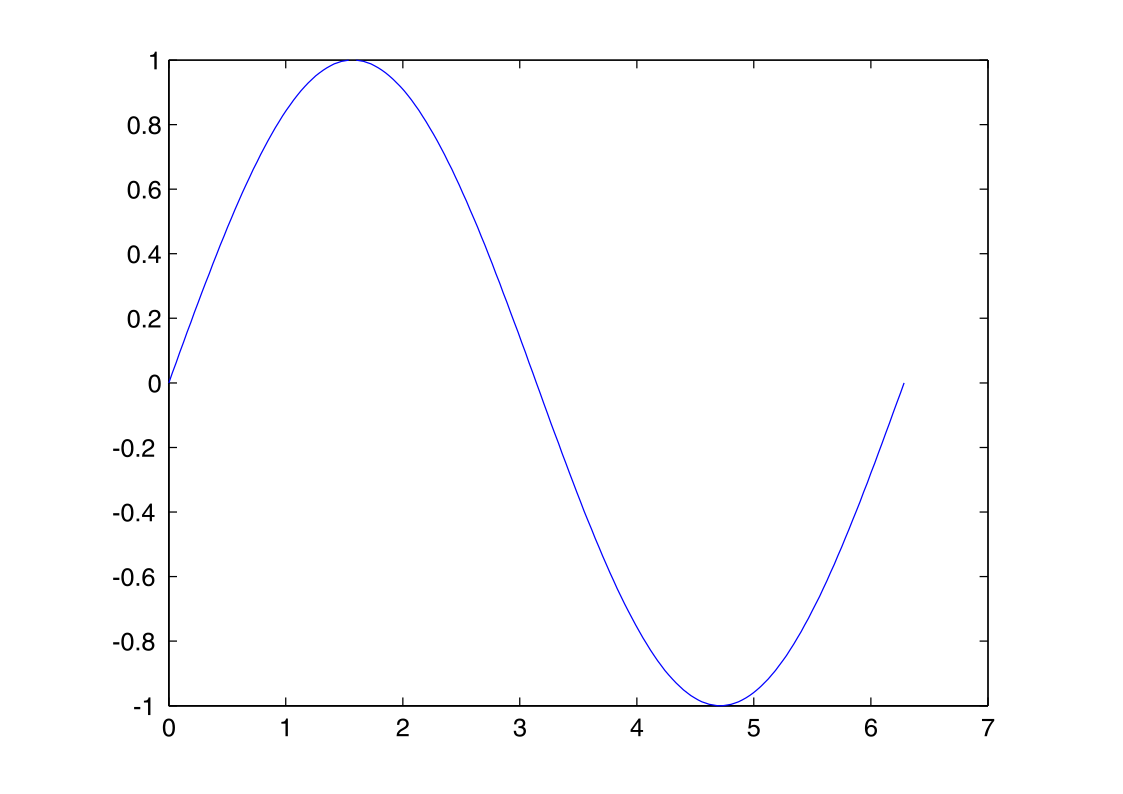
MATLAB has tightly integrated graph-plotting features. For example, the function plot can be used to produce a graph from two vectors x and y. The code:
x = 0:pi/100:2*pi;
y = sin(x);
plot(x,y)
produces the following figure of the sine function:
MATLAB supports three-dimensional graphics as well:
| [[File:MATLAB mesh sinc3D.svg]] | [[File:MATLAB surf sinc3D.svg]] |
|---|
MATLAB supports developing graphical user interface (GUI) applications. UIs can be generated either programmatically or using visual design environments such as GUIDE and App Designer.
MATLAB and other languages
MATLAB can call functions and subroutines written in the programming languages C or Fortran. A wrapper function is created allowing MATLAB data types to be passed and returned. MEX files (MATLAB executables) are the dynamically loadable object files created by compiling such functions. Since 2014 increasing two-way interfacing with Python was being added.
Libraries written in Perl, Java, ActiveX or .NET can be directly called from MATLAB, and many MATLAB libraries (for example XML or SQL support) are implemented as wrappers around Java or ActiveX libraries. Calling MATLAB from Java is more complicated, but can be done with a MATLAB toolbox which is sold separately by MathWorks, or using an undocumented mechanism called JMI (Java-to-MATLAB Interface), (which should not be confused with the unrelated Java Metadata Interface that is also called JMI). Official MATLAB API for Java was added in 2016.
As alternatives to the MuPAD based Symbolic Math Toolbox available from MathWorks, MATLAB can be connected to Maple or Mathematica.
Libraries also exist to import and export MathML.
Relations to US sanctions
In 2020, MATLAB withdrew services from two Chinese universities as a result of US sanctions. The universities said this will be responded to by increased use of open-source alternatives and by developing domestic alternatives.
Notes
References
- (2003). "The L-Shaped Membrane". MathWorks.
- "System Requirements and Platform Availability". MathWorks.
- "Platform Road Map for MATLAB and Simulink Product Families".
- "An interview with CLEVE MOLER Conducted by Thomas Haigh On 8 and 9 March, 2004 Santa Barbara, California". Computer History Museum.
- (February 14, 2012). "Why We Created Julia". Julia Language.
- Eaton, John W.. (May 21, 2001). "Octave: Past, Present, and Future". Texas-Wisconsin Modeling and Control Consortium.
- "History". Scilab.
- "Protect Your Source Code". MathWorks.
- "MEX Platform Compatibility". MathWorks.
- "MAT-File Versions". MathWorks.
- "Save Figure to Reopen in MATLAB Later". MathWorks.
- "Live Code File Format (.mlx)". MathWorks.
- "MATLAB App Designer". MathWorks.
- "Toolbox Distribution". MathWorks.
- "MATLAB App Installer File". MathWorks.
- "Support Package Installation". MathWorks.
- "Matrices and Arrays - MATLAB & Simulink".
- The MathWorks. (February 2020). "Company Overview".
- (2017-11-09). "Current number of matlab users worldwide".
- (2005). "Reviews of Maple, Mathematica, and Matlab: Coming Soon to a Publication Near You". Institute of Electrical and Electronics Engineers (IEEE).
- "A Brief History of MATLAB".
- Haigh, Thomas. "Cleve Moler: Mathematical Software Pioneer and Creator of Matlab". IEEE Computer Society.
- (June 12, 2020). "A history of MATLAB". Association for Computing Machinery (ACM).
- (2020). "MATLAB Programming: Mathematical Problem Solutions". De Gruyter.
- Press, CRC. (2008). "Solving Applied Mathematical Problems with MATLAB". CRC Press.
- (2011). "Numerical Methods with Worked Examples: Matlab Edition". Springer Netherlands.
- Tranquillo, J.V.. (2011). "MATLAB for Engineering and the Life Sciences". Morgan & Claypool Publishers.
- LoTurco, Lori. (January 28, 2020). "Accelerating the pace of engineering". Massachusetts Institute of Technology.
- (1993). "Review of MATLAB, Version 4.0". Wiley.
- (2014). "Statistics in MATLAB: A Primer". CRC Press.
- (2013). "System Simulation Techniques with MATLAB and Simulink". Wiley.
- "MATLAB Previous releases". MathWorks.
- "MATLAB Documentation". MathWorks.
- "Comparing MATLAB with Other OO Languages". MathWorks.
- "Create Symbolic Variables and Expressions". MathWorks.
- "Matrix Indexing". MathWorks.
- "Structures". MathWorks.
- "Generate Field Names from Variables". MathWorks.
- "Case and Space Sensitivity". MathWorks.
- "Function Handles". MathWorks.
- "Anonymous Functions". MathWorks.
- "Nested Functions". MathWorks..
- "Object-Oriented Programming". MathWorks.
- "Comparing Handle and Value Classes". MathWorks.
- (April 30, 2011). "MATLAB GUI". MathWorks.
- "Create a Simple GUIDE GUI". MathWorks.
- "MATLAB App Designer". MathWorks.
- "Application Programming Interfaces to MATLAB". MathWorks.
- "Create MEX-Files". MathWorks.
- Spielman, Dan. (February 10, 2004). "Connecting C and Matlab". Yale University, Computer Science Department.
- "MATLAB Engine for Python". MathWorks.
- "Call Python Libraries". MathWorks.
- "External Programming Language Interfaces". MathWorks.
- "Call Perl script using appropriate operating system executable". MathWorks.
- "MATLAB Builder JA". MathWorks.
- Altman, Yair. (April 14, 2010). "Java-to-Matlab Interface". Undocumented Matlab.
- Kaplan, Joshua. "matlabcontrol JMI".
- "MATLAB Engine API for Java". MathWorks.
- Germundsson, Roger. (September 30, 1998). "MaMa: Calling MATLAB from Mathematica with MathLink". Wolfram Library Archive.
- (2013). "MATLink: Communicate with MATLAB from Mathematica".
- Weitzel, Michael. (September 1, 2006). "MathML import/export". MathWorks - File Exchange.
- (2020-06-12). "US military ban locks two Chinese universities out of popular software".
This article was imported from Wikipedia and is available under the Creative Commons Attribution-ShareAlike 4.0 License. Content has been adapted to SurfDoc format. Original contributors can be found on the article history page.
Ask Mako anything about MATLAB — get instant answers, deeper analysis, and related topics.
Research with MakoFree with your Surf account
Create a free account to save articles, ask Mako questions, and organize your research.
Sign up freeThis content may have been generated or modified by AI. CloudSurf Software LLC is not responsible for the accuracy, completeness, or reliability of AI-generated content. Always verify important information from primary sources.
Report