From Surf Wiki (app.surf) — the open knowledge base
Kernel panic
Fatal error condition in Unix-like operating systems

Fatal error condition in Unix-like operating systems

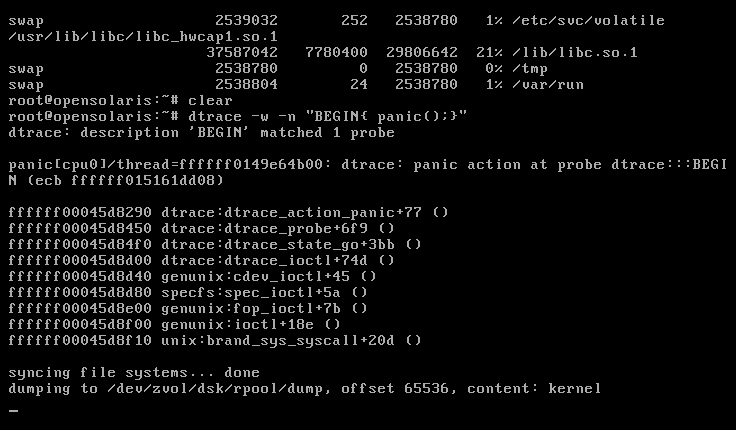

A kernel panic (sometimes abbreviated as KP) is a safety measure taken by an operating system's kernel upon detecting an internal fatal error in which either it is unable to safely recover or continuing to run the system would have a higher risk of major data loss. The term is largely specific to Unix and Unix-like systems. The equivalent on Microsoft Windows operating systems is a stop error, often called a "blue screen of death (BSOD)".
The kernel routines that handle panics, known as panic() in AT&T-derived and BSD Unix source code, are generally designed to output an error message to the console, dump an image of kernel memory to disk for post-mortem debugging, and then either wait for the system to be manually rebooted, or initiate an automatic reboot. The information provided is of a highly technical nature and aims to assist a system administrator or software developer in diagnosing the problem. Kernel panics can also be caused by errors originating outside kernel space. For example, many Unix operating systems panic if the init process, which runs in user space, terminates.
History
The Unix kernel maintains internal consistency and runtime correctness with assertions as the fault detection mechanism. The basic assumption is that the hardware and the software should perform correctly and a failure of an assertion results in a panic, i.e. a voluntary halt to all system activity. The kernel panic was introduced in an early version of Unix and demonstrated a major difference between the design philosophies of Unix and its predecessor Multics. Multics developer Tom van Vleck recalls a discussion of this change with Unix developer Dennis Ritchie:
I remarked to Dennis that easily half the code I was writing in Multics was error recovery code. He said, "We left all that stuff out. If there's an error, we have this routine called panic, and when it is called, the machine crashes, and you holler down the hall, 'Hey, reboot it.

The original panic() function was essentially unchanged from Fifth Edition UNIX to the VAX-based UNIX 32V and output only an error message with no other information, then dropped the system into an endless idle loop. As the Unix codebase was enhanced, the panic() function was also enhanced to dump various forms of debugging information to the console.
Causes
A panic may occur as a result of a hardware failure or a software bug in the operating system. In many cases, the operating system is capable of continued operation after an error has occurred. If the system is in an unstable state, rather than risking security breaches and data corruption, the operating system stops in order to prevent further damage, which helps to facilitate diagnosis of the error and may restart automatically.

After recompiling a kernel binary image from source code, a kernel panic while booting the resulting kernel is a common problem if the kernel was not correctly configured, compiled or installed. Add-on hardware or malfunctioning RAM could also be sources of fatal kernel errors during start up, due to incompatibility with the OS or a missing device driver. A kernel may also go into panic() if it is unable to locate a root file system. During the final stages of kernel userspace initialization, a panic is typically triggered if the spawning of init fails. A panic might also be triggered if the init process terminates, as the system would then be unusable.
The following is an implementation of the Linux kernel final initialization in kernel_init():
static int __ref kernel_init(void *unused)
{

         ...

        /*
         * We try each of these until one succeeds.
         *
         * The Bourne shell can be used instead of init if we are
         * trying to recover a really broken machine.
         */
        if (execute_command) {
                if (!run_init_process(execute_command))
                        return 0;
                pr_err("Failed to execute %s.  Attempting defaults...\n",
                        execute_command);
        }
        if (!run_init_process("/sbin/init") ||
            !run_init_process("/etc/init") ||
            !run_init_process("/bin/init") ||
            !run_init_process("/bin/sh"))
                return 0;

        panic("No init found.  Try passing init= option to kernel. "
              "See Linux Documentation/init.txt for guidance.");
}
Operating system specifics
Linux


Kernel panics appear in Linux like in other Unix-like systems; however, serious but non-fatal errors can generate another kind of error condition, known as a kernel oops. In this case, the kernel normally continues to run after killing the offending process. As an oops could cause some subsystems or resources to become unavailable, they can later lead to a full kernel panic.
On Linux, a kernel panic causes keyboard LEDs to blink as a visual indication of a critical condition.{{cite book | access-date = 2016-02-05 | archive-date = April 1, 2024 | archive-url = https://web.archive.org/web/20240401232239/https://books.google.com/books?id=FyRhZJ3h3VQC&q=linux+kernel+panic+keyboard+led+blinking&pg=PA62#v=snippet&q=linux%20kernel%20panic%20keyboard%20led%20blinking&f=false | url-status = live
As of Linux 6.10, drm_panic was merged allowing DRM drivers to support drawing a panic screen to inform the user that a panic occurred. This allows a panic screen to appear even when a display server was running when the panic occurred.
As of Linux 6.12, drm_panic was extended where the stack trace can be encoded as a QR code.
macOS
When a kernel panic occurs in Mac OS X 10.2 through 10.7, the computer displays a multilingual message informing the user that they need to reboot the system. Prior to 10.2, a more traditional Unix-style panic message was displayed; in 10.8 and later, the computer automatically reboots and the message is only displayed as a skippable warning afterward. The format of the message varies from version to version:
- 10.0–10.1: The system displays text on the screen, giving details about the error, and becomes unresponsive.
- 10.2: Rolls down a black transparent curtain then displays a message on a white background informing the user that they should restart the computer. The message is shown in English, French, German and Japanese.
- 10.3–10.5: Similar to 10.2, but the background of the error message is dark grey.
- 10.6–10.7: The text has been revised and now includes a Spanish translation.
- 10.8 and later: The computer becomes unresponsive before it immediately reboots. After restarting, it shows a message for a few seconds informing the user that a problem caused the computer to restart, before continuing to boot. The message now includes a Chinese translation.
In macOS 10.8, if five new kernel panics occurred within three minutes of the first one, the Mac would display a prohibitory sign for thirty seconds, and then shut down; this is known as a "recurring kernel panic".
In all versions above 10.2, the text is superimposed on a standby symbol and is not full screen. Debugging information is saved in NVRAM and written to a log file on reboot. In 10.7 there is a feature to automatically restart after a kernel panic. In some cases, on 10.2 and later, white text detailing the error may appear in addition to the standby symbol.
File:Mac OS X 10.0 10.1 Kernel Panic.jpg|Mac OS X 10.0–10.1 kernel panic File:Mac OS X 10.2 Kernel Panic.jpg|Mac OS X 10.2 kernel panic File:MacOSX kernel panic.png|Mac OS X 10.3–10.5 kernel panic File:Panic10.6.png|Mac OS X 10.6 and 10.7 kernel panic File:OS X Mountain Lion kernel panic.jpg|Message shown after a system restart due to a kernel panic in OS X 10.8 and later versions
References
References
- "KP - Kernel Panic (Linux) {{!}} AcronymFinder".
- "FreeBSD 11.0 - man page for panic (freebsd section 9) - Unix & Linux Commands".
- "boot failure-init died - Unix Linux Forums - HP-UX".
- Randolph J. Herber. (September 1, 1999). "Re: PANIC: init died".
- (1998). "Reliable computer systems: design and evaluation". A K Peters, Ltd..
- "Unix and Multics".
- Steven M. Hancock. (November 22, 2002). "Tru64 UNIX troubleshooting: diagnosing and correcting system problems". Digital Press.
- Michael Jang. (2006). "Linux annoyances for geeks". O'Reilly Media, Inc..
- David Pogue. (December 17, 2009). "Switching to the Mac: The Missing Manual, Snow Leopard Edition". O'Reilly Media, Inc..
- Greg Kroah-Hartman. (2007). "Linux kernel in a nutshell". O'Reilly Media, Inc..
- Wolfgang Mauerer. (September 26, 2008). "Professional Linux Kernel Architecture". John Wiley and Sons.
- "linux/init/main.c".
- "''Linux Device Drivers'', Chapter 4".
- "Changes/EnableDrmPanic". Fedora Project Wiki.
- Thomas Zimmermann. (29 August 2024). "[PULL] drm-misc-next".
- "OS X: About kernel panics - Apple Support".
- "A New Screen of Death for Mac OS X".
- "OS X: About kernel panics". Apple.
This article was imported from Wikipedia and is available under the Creative Commons Attribution-ShareAlike 4.0 License. Content has been adapted to SurfDoc format. Original contributors can be found on the article history page.
Ask Mako anything about Kernel panic — get instant answers, deeper analysis, and related topics.
Research with MakoFree with your Surf account
Create a free account to save articles, ask Mako questions, and organize your research.
Sign up freeThis content may have been generated or modified by AI. CloudSurf Software LLC is not responsible for the accuracy, completeness, or reliability of AI-generated content. Always verify important information from primary sources.
Report