From Surf Wiki (app.surf) — the open knowledge base
Histogram matching
Transformation in image processing

Transformation in image processing
In image processing, histogram matching or histogram specification is the transformation of an image so that its histogram matches a specified histogram. The well-known histogram equalization method is a special case in which the specified histogram is uniformly distributed.{{cite conference
It is possible to use histogram matching to balance detector responses as a relative detector calibration technique. It can be used to normalize two images, when the images were acquired at the same local illumination (such as shadows) over the same location, but by different sensors, atmospheric conditions or global illumination.
Implementation
Consider a grayscale input image X. It has a probability density function pr(r), where r is a grayscale value, and pr(r) is the probability of that value. This probability can easily be computed from the histogram of the image by
p_r (r_j )= {n_j \over n}
where nj is the frequency of the grayscale value rj, and n is the total number of pixels in the image.
Now consider a desired output probability density function pz(z). A transformation of pr(r) is needed to convert it to pz(z).
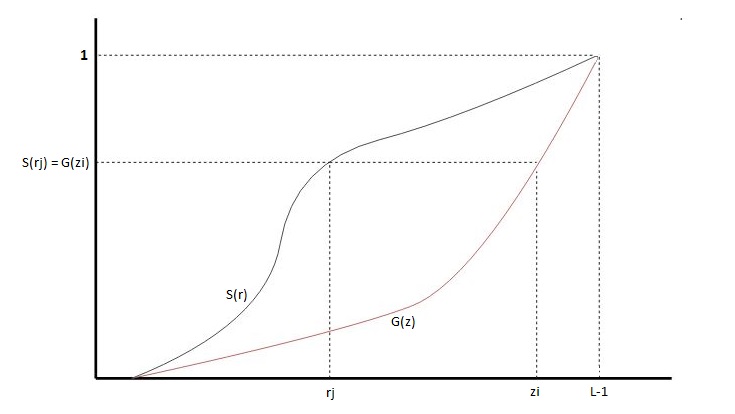
Each pdf (probability density function) can easily be mapped to its cumulative distribution function by
: S(r_k )= \sum_{j=0}^k p_r(r_j),\qquad k = 0,1,2,3,\ldots,L-1
: G(z_k )= \sum_{j=0}^k p_z(z_j),\qquad k = 0,1,2,3,\ldots,L-1
where L is the total number possible of gray levels (256 for a standard image).
The idea is to map each r value in X to the z value that has the same probability in the desired pdf. I.e. S(r**j) = G(z**i) or z = G−1(S(r)).
Example
The following input grayscale image is to be changed to match the reference histogram.
The input image has the following histogram:

It will be matched to this reference histogram to emphasize the lower gray levels.

Algorithm
Given two images, the reference and the target images, we compute their histograms. Following, we calculate the cumulative distribution functions of the two images' histograms: F_1(), for the reference image and F_2(), for the target image. Then for each gray level G_1\in[0,255], we find the gray level G_2, for which F_1(G_1)=F_2(G_2),, and this is the result of histogram matching function: M(G_1)=G_2,. Finally, we apply the function M() on each pixel of the reference image.
Exact histogram matching
In typical real-world applications, histogram matching can only approximate the specified histogram. All pixels of a particular value in the original image must be transformed to just one value in the output image.
Exact histogram matching is the problem of finding a transformation for a discrete image so that its histogram exactly matches the specified histogram.{{cite journal
Because of this there may be holes or open spots in the output matched histogram.
Multiple histogram matching
The histogram matching algorithm can be extended to find a monotonic mapping between two sets of histograms. Given two sets of histograms P={p_i}{i=1}^k and Q = {q_i }{i=1}^k , the optimal monotonic color mapping M is calculated to minimize the distance between the two sets simultaneously, namely \operatorname{argmin}_M \sum_k d(M(p_k),q_k) where d(\cdot,\cdot) is a distance metric between two histograms. The optimal solution is calculated using dynamic programming.
References
| book-title = Proceedings of the IEEE International Conference on Image Processing
References
- (2008). "Digital Image Processing". Prentice Hall.
- Gonzalez, Rafael. (2017). "Digital image processing 4th Edition". Pearson.
This article was imported from Wikipedia and is available under the Creative Commons Attribution-ShareAlike 4.0 License. Content has been adapted to SurfDoc format. Original contributors can be found on the article history page.
Ask Mako anything about Histogram matching — get instant answers, deeper analysis, and related topics.
Research with MakoFree with your Surf account
Create a free account to save articles, ask Mako questions, and organize your research.
Sign up freeThis content may have been generated or modified by AI. CloudSurf Software LLC is not responsible for the accuracy, completeness, or reliability of AI-generated content. Always verify important information from primary sources.
Report