From Surf Wiki (app.surf) — the open knowledge base
Gopher (protocol)
TCP/IP application layer protocol
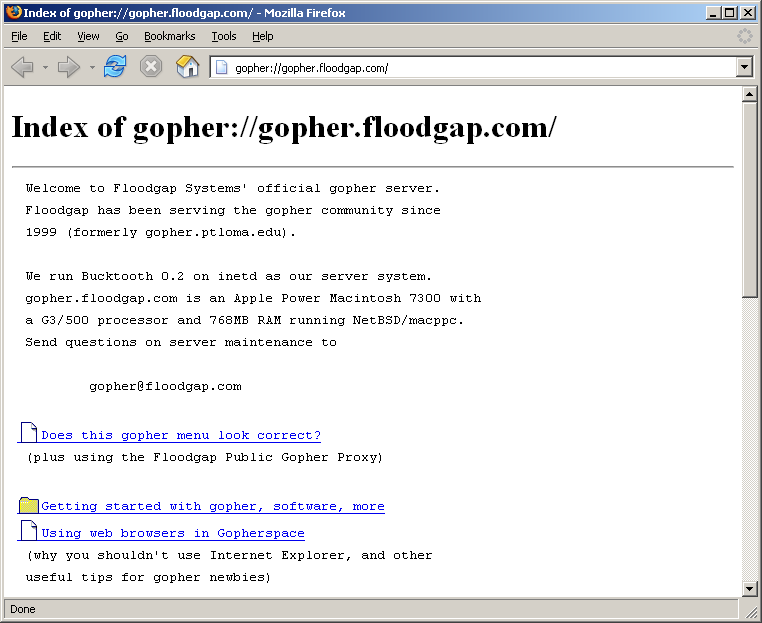
TCP/IP application layer protocol
Gopher () is a communication protocol designed for distributing, searching, and retrieving documents in Internet Protocol networks. The design of the Gopher protocol and user interface is menu-driven, and presented an alternative to the World Wide Web in its early stages, but ultimately fell into disfavor, yielding to Hypertext Transfer Protocol (HTTP). The Gopher ecosystem is often regarded as the effective predecessor of the World Wide Web.
Usage
The Gopher protocol was invented by a team led by Mark P. McCahill at the University of Minnesota. It offers some features not natively supported by the Web and imposes a much stronger hierarchy on the documents it stores. Its text menu interface is well-suited to computing environments that rely heavily on remote text-oriented computer terminals, which were still common at the time of its creation in 1991, and the simplicity of its protocol facilitated a wide variety of client implementations.
Gopher's hierarchical structure provided a platform for the first large-scale electronic library connections. The Gopher protocol is still in use by enthusiasts, and although it has been almost entirely supplanted by the Web, a small population of actively maintained servers remains.
Origins
The Gopher system was released in mid-1991 by Mark P. McCahill, Farhad Anklesaria, Paul Lindner, Daniel Torrey, and Bob Alberti of the University of Minnesota in the United States. Its central goals were, as stated in :
- A file-like hierarchical arrangement that would be familiar to users.
- A simple syntax.
- A system that can be created quickly and inexpensively.
- Extensibility of the file system metaphor; allowing addition of searches for example.
Gopher combines document hierarchies with collections of services, including WAIS, the Archie and Veronica search engines, and gateways to other information systems such as File Transfer Protocol (FTP) and Usenet.
The general interest in campus-wide information systems (CWISs) in higher education at the time, and the ease of setup of Gopher servers to create an instant CWIS with links to other sites' online directories and resources, were the factors contributing to Gopher's rapid adoption.
The name was coined by Anklesaria as a play on several meanings of the word "gopher".{{Cite AV media |url-status=live |archive-url=https://web.archive.org/web/20110720093228/http://mediamill.cla.umn.edu/mediamill/display/69597 |archive-date=20 July 2011
Decline
The World Wide Web was in its infancy in 1991, and Gopher services quickly became established. By the late 1990s, Gopher had ceased expanding. Several factors contributed to Gopher's stagnation:
- In February 1993, the University of Minnesota announced that it would charge licensing fees for the use of its implementation of the Gopher server. Users became concerned that fees might also be charged for independent implementations. Gopher expansion stagnated, to the advantage of the World Wide Web which released the WWW into the public domain in April 1993, to which CERN maintained. In September 2000, the University of Minnesota re-licensed its Gopher software under the GNU General Public License.
- Gopher client functionality was quickly duplicated by the early Mosaic web browser, which subsumed its protocol.
- Gopher has a more rigid structure than the free-form HyperText Markup Language (HTML) of the Web. Every Gopher document has a defined format and type, and the typical user navigates through a single server-defined menu system to get to a particular document. This can be quite different from the way a user finds documents on the Web.
- Failure to follow the open systems model and bad publicity in comparison to the World Wide Web
Gopher remains in active use by its enthusiasts, and there have been attempts to revive Gopher on modern platforms and mobile devices. One attempt is The Overbite Project, which hosts various browser extensions and modern clients.
Server census

- , there remained about 160 gopher servers indexed by Veronica-2, reflecting a slow growth from 2007 when there were fewer than 100. They are typically infrequently updated. On these servers, Veronica indexed approximately 2.5 million unique selectors. A handful of new servers were being set up every year by hobbyists with over 50 having been set up and added to Floodgap's list since 1999. A snapshot of Gopherspace in 2007 circulated on BitTorrent and was still available in 2010. Due to the simplicity of the Gopher protocol, setting up new servers or adding Gopher support to browsers is often done in a tongue-in-cheek manner, principally on April Fools' Day.
| Index Date | Gopher Servers | Unique Selectors |
|---|---|---|
| 86 | 740,000 | |
| 148 | 1,220,665 | |
| 144 | ||
| 144 | 3,314,158 | |
| 137 | 4,396,061 | |
| 146 | 5,176,602 | |
| 260 | ||
| 297 | 3,946,750 | |
| 320 | ||
| 395 | ||
| 358 | 5,973,552 | |
| 343 | 5,294,599 | |
| 333 | 5,098,733 | |
| 323 | 5,113,957 | |
| 296 | 5,113,382 | |
| 432 | 5,254,158 | |
| 411 | 5,856,111 |
Technical details
The conceptualization of knowledge in "Gopher space" or a "cloud" as specific information in a particular file, and the prominence of the FTP, influenced the technology and the resulting functionality of Gopher.
Gopher characteristics
Gopher is designed to function and to appear much like a mountable read-only global network file system (and software, such as [gopher://gopher.r-36.net/1/scm/gopherfs gopherfs], is available that can actually mount a Gopher server as a FUSE resource). At a minimum, whatever can be done with data files on a CD-ROM, can be done on Gopher.
A Gopher system consists of a series of hierarchical hyperlinkable menus. The choice of menu items and titles is controlled by the administrator of the server.
Similar to a file on a Web server, a file on a Gopher server can be linked to as a menu item from any other Gopher server. Many servers take advantage of this inter-server linking to provide a directory of other servers that the user can access.
Protocol
The Gopher protocol was first described in . Internet Assigned Numbers Authority (IANA) has assigned Transmission Control Protocol (TCP) port 70 to the Gopher protocol. The protocol is simple to negotiate, making it possible to browse without using a client.
User request
First, the client establishes a TCP connection with the server on port 70, the standard gopher port. The client then sends a string followed by a carriage return followed by a line feed (a "CR + LF" sequence). This is the selector, which identifies the document to be retrieved. If the item selector were an empty line, the default directory would be selected.
Server response
The server then replies with the requested item and closes the connection. According to the protocol, before the connection closes, the server should send a full-stop (i.e., a period character) on a line by itself. However, not all servers conform to this part of the protocol and the server may close a connection without returning a final full-stop. The main type of reply from the server is a text or binary resource. Alternatively, the resource can be a menu: a form of structured text resource providing references to other resources.
Because of the simplicity of the Gopher protocol, tools such as netcat make it possible to download Gopher content easily from a command line:
$ echo jacks/jack.exe | nc gopher.example.org 70 > jack.exeThe protocol is also supported by cURL since 7.21.2-DEV, which was released in 2010.
Search request
The selector string in the request can optionally be followed by a tab character and a search string. This is used by item type 7.
Source code of a menu
Gopher menu items are defined by lines of tab-separated values in a text file. This file is sometimes called a gophermap. As the source code to a gopher menu, a gophermap is roughly analogous to an HTML file for a web page. Each tab-separated line (called a selector line) gives the client software a description of the menu item: what it is, what it is called, and where it leads to. The client displays the menu items in the order that they appear in the gophermap.
The first character in a selector line indicates the item type, which tells the client what kind of file or protocol the menu item points to. This helps the client decide what to do with it. Gopher's item types are a more basic precursor to the media type system used by the Web and email attachments.
The item type is followed by the user display string (a description or label that represents the item in the menu); the selector (a path or other string for the resource on the server); the hostname (the domain name or IP address of the server), and the network port.
All lines in a gopher menu are terminated by "CR + LF".
Example of a selector line in a menu source: The following selector line generates a link to the "/home" directory at the subdomain gopher.floodgap.com, on port 70. The item type of 1 indicates that the linked resource is a Gopher menu itself. The string "Floodgap Home" is what the client will show to the user when visiting the example menu.
1Floodgap Home /home gopher.floodgap.com 70
| Item type | User display string | Selector | Hostname | Port |
|---|---|---|---|---|
| 1 | Floodgap Home | /home | gopher.floodgap.com | 70 |
Item types
In a Gopher menu's source code, a one-character code indicates what kind of content the client should expect. This code may either be a digit or a letter of the alphabet; letters are case-sensitive.
The technical specification for Gopher, , defines 14 item types. The later gopher+ specification defined an additional 3 types. A one-character code indicates what kind of content the client should expect. Item type is an error code for exception handling. Gopher client authors improvised item types (HTML), (informational message), and (sound file) after the publication of RFC 1436. Browsers like Netscape Navigator and early versions of Microsoft Internet Explorer would prepend the item type code to the selector as described in , so that the type of the gopher item could be determined by the url itself. Most gopher browsers still available, use these prefixes in their urls.
| Canonical types}} | gopher+ types}} | Non-canonical types}} | |
|---|---|---|---|
| Text file | |||
| Gopher submenu | |||
| CCSO Nameserver | |||
| Error code returned by a Gopher server to indicate failure | |||
| BinHex-encoded file (primarily for Macintosh computers) | |||
| DOS file | |||
| uuencoded file | |||
| Gopher full-text search | |||
| Telnet | |||
| Binary file | |||
| Mirror or alternate server (for load balancing or in case of primary server downtime) | |||
| GIF file | |||
| Image file | |||
| Telnet 3270 | |||
| Bitmap image | |||
| Movie file | |||
| {{okay | ** | Sound file | |
| d | Doc. Seen used alongside PDF and .doc files | ||
| h | HTML file | ||
| i | Informational message, widely used. | ||
| p | image file "(especially the PNG format)" | ||
| r | document RTF file ("Rich Text Format") | ||
| s | Sound file (especially the WAV format) | ||
| P | PDF (Portable Document Format) file | ||
| X | XML (Extensible Markup Language) file |
Here is an example gopher session where the user requires a gopher menu ( on the first line):
/Reference 1CIA World Factbook /Archives/mirrors/textfiles.com/politics/CIA gopher.quux.org 70 0Jargon 4.2.0 /Reference/Jargon 4.2.0 gopher.quux.org 70 + 1Online Libraries /Reference/Online Libraries gopher.quux.org 70 + 1RFCs: Internet Standards /Computers/Standards and Specs/RFC gopher.quux.org 70 1U.S. Gazetteer /Reference/U.S. Gazetteer gopher.quux.org 70 + iThis file contains information on United States fake (NULL) 0 icities, counties, and geographical areas. It has fake (NULL) 0 ilatitude/longitude, population, land and water area, fake (NULL) 0 iand ZIP codes. fake (NULL) 0 i fake (NULL) 0 iTo search for a city, enter the city's name. To search fake (NULL) 0 ifor a county, use the name plus County -- for instance, fake (NULL) 0 iDallas County. fake (NULL) 0
The gopher menu sent back from the server is a sequence of lines, each of which describes an item that can be retrieved. Most clients will display these as hypertext links, and so allow the user to navigate through gopherspace by following the links. This menu includes a text resource (itemtype on the third line), multiple links to submenus (itemtype , on the second line as well as lines 4–6) and a non-standard information message (from line 7 on), broken down to multiple lines by providing dummy values for selector, host and port.
Client software
Gopher clients
These are clients, libraries, and utilities primarily designed to access gopher resources.
| Client | Updated | License | Language | Type | Notes | ACID | Bombadillo | elpher | eva | Gopher Browser | Gopher Client | gophercle | Gopherus | Gophie | Kristall | Lagrange | Little Gopher Client | ncgopher | Pocket Gopher | sacc | snarf | w3m |
|---|---|---|---|---|---|---|---|---|---|---|---|---|---|---|---|---|---|---|---|---|---|---|
| 2021 | ? | C | GUI (Windows) | Supports page cache, TFTP and has G6 extension. | ||||||||||||||||||
| 2022 | GPLv3 | Go | TUI (Linux, BSD, macOS) | Supports Gopher, Gemini, Finger | ||||||||||||||||||
| 2022 | GPLv3 | Emacs Lisp | TUI/GUI | Elpher: a gopher, finger, and gemini client for GNU Emacs | ||||||||||||||||||
| 2022 | GPLv3 | Rust | GUI (Linux, FreeBSD) | Eva (as in extra vehicular activity, or spacewalk) is a Gemini and Gopher protocol browser in GTK 4. | ||||||||||||||||||
| 2019 | Closed source | VB.NET | GUI (Windows) | |||||||||||||||||||
| 2018 | App (iOS) | Supports text reflow, bookmarks, history, etc. | ||||||||||||||||||||
| 2022 | MIT | Java | App (Android) | Supports only basic functionalities like bookmarks, session-history, downloads, etc. | ||||||||||||||||||
| 2020 | BSD 2-clause | C | TUI (Linux, BSD, Windows, DOS) | Features bookmarks and page caching. | ||||||||||||||||||
| 2020 | GPLv3 | Java | GUI (Windows, MacOS, Linux) | |||||||||||||||||||
| 2020 | GPLv3 | C++ | GUI (Linux) | Gemini GUI client with support for Gopher, Finger, and www. | ||||||||||||||||||
| 2022 | BSD 2-clause | C | GUI | Gemini GUI client with Gopher and finger support. Switches to gophermap/type 1 requests in parent/root navigation. | ||||||||||||||||||
| 2019 | Pascal | Linux, Mac, Windows | Sidebar with a hierarchical view | |||||||||||||||||||
| 2022 | BSD 2-clause | Rust | TUI | ncgopher is a gopher and gemini client using ncurses. | ||||||||||||||||||
| 2019 | Unlicense | Java | App (Android) | Supports bookmarks, history, downloads, etc. | ||||||||||||||||||
| 2022 | C | TUI | sacc(omys) is a terminal gopher client. | |||||||||||||||||||
| 2020 | GPL | C | CLI | Simple Non-interactive All-purpose Resource Fetcher | ||||||||||||||||||
| 2021 | MIT | C | TUI | w3m is a text-based web browser |
Other clients
Clients like web browsers, libraries, and utilities primarily designed to access World Wide Web resources, but which maintain(ed) gopher support.
- Browse, a browser for RISC OS
- Camino, versions 1.0 to 2.1.2, always uses port 70.
- Classilla, versions 9.0 to 9.3.4b1 as of March 2021, hardcoded to port 70 from 9.0 to 9.2; whitelisted ports from 9.2.1
- cURL, a command line client for accessing URLs for various protocols
- Dillo+
- Dooble
- Edbrowse, a line-oriented editor and browser with an interface like that of ed (text editor)
- ELinks, versions 0.10.0 to 0.12pre6 as of October 2012, unmaintained browser with gopher build option. Fork felinks offers support as a build option
- Falkon, with plug-in only, requires Falkon ≥ 3.1.0 with both the KDE Frameworks Integration extension (shipped with Falkon ≥ 3.1.0) enabled and the (separate) kio_gopher plug-in ≥ 0.1.99 (first release for KDE Frameworks 5) installed
- Mozilla Firefox versions 0.1 to 3.6, built-in support dropped from Firefox 4.0 onwards; can be added back by installing one of the extensions by the Overbite Project
- Galeon version 2.0.7
- Epiphany, until version 2.26.3, disabled with switch to WebKit
- Google Chrome, with extension only, Burrow extension
- Internet Explorer, dropped with version 6: Support removed by MS02-047 from IE 6 SP1 can be re-enabled in the Windows Registry. Always uses port 70. Gopher support was disabled in Internet Explorer versions 5.x and 6 for Windows in August 2002 by a patch meant to fix a security vulnerability in the browser's Gopher protocol handler to reduce the attack surface which was included in IE6 SP1; however, it can be re-enabled by editing the Windows registry. In Internet Explorer 7, Gopher support was removed on the WinINET level.
- Internet Explorer for Mac version 5.2.3, PowerPC-only
- K-Meleon, dropped support
- Konqueror, with plug-in only, requires kio_gopher plug-in
- libwww, versions 1.0c (December 1992) to 5.4.1 December 2006, libwww is a discontinued API for internet applications. A modern fork is maintained in Lynx
- Line Mode Browser, since version 1.1, January 1992
- Lynx
- Mosaic, version 3.0
- Netscape Navigator
- NetSurf, under development, based on the cURL fetcher
- OmniWeb, since version 5.9.2 (April 2009), first WebKit Browser to support Gopher
- Opera, Opera 9.0 included a proxy capability
- Pavuk, a web mirror (recursive download) software program
- SeaMonkey, version 1.0 to 2.0.14, built-in support dropped from version 2.1 onward; could be added back to some versions via Overbite project, but no longer supported.
- WebPositive, a WebKit-based browser used in the Haiku operating system
Browsers with no Gopher native support can still access servers using one of the available Gopher to HTTP gateways or proxy server that converts Gopher menus into HTML; known proxies are the Floodgap Public Gopher proxy and Gopher Proxy. Similarly, certain server packages such as GN and PyGopherd have built-in Gopher to HTTP interfaces. Squid Proxy software gateways any gopher:// URL to HTTP content, enabling any browser or web agent to access gopher content easily.
For Mozilla Firefox and SeaMonkey, Overbite extensions extend Gopher browsing and support the current versions of the browsers (Firefox Quantum v ≥57 and equivalent versions of SeaMonkey):
- OverbiteWX redirects
gopher://URLs to a proxy; - OverbiteNX adds native-like support;
- for Firefox up to 56.*, and equivalent versions of SeaMonkey, OverbiteFF adds native-like support, but it is no longer maintained
OverbiteWX includes support for accessing Gopher servers not on port 70 using a whitelist and for CSO/ph queries. OverbiteFF always uses port 70.
For Chromium and Google Chrome, Burrow is available. It redirects
gopher://URLs to a proxy. In the past an Overbite proxy-based extension for these browsers was available but is no longer maintained and does not work with the current (23) releases.
For Konqueror, Kio gopher is available.
As the bandwidth-sparing simple interface of Gopher can be a good match for mobile phones and personal digital assistants (PDAs), the early 2010s saw a renewed interest in native Gopher clients for popular smartphones.
Gopher popularity was at its height at a time when there were still many equally competing computer architectures and operating systems. As a result, there are several Gopher clients available for Acorn RISC OS, AmigaOS, Atari MiNT, Conversational Monitor System (CMS), DOS, classic Mac OS, MVS, NeXT, OS/2 Warp, most Unix-like operating systems, VMS, Windows 3.x, and Windows 9x. GopherVR was a client designed for 3D visualization, and there is even a Gopher client in MOO. Most such clients are hard-coded to work on Transmission Control Protocol (TCP) port 70.
Server software
Because the protocol is trivial to implement in a basic fashion, there are many server packages still available, and some are still maintained.
| Server | Developed by | Latest version | Release date | License | Written in | Notes | Aftershock | Apache::GopherHandler | Atua | [gopher://gopher.floodgap.com/1/buck/ Bucktooth] (gopher link) (proxied link) | Flask-Gopher | geomyid | [gopher://gopher.r-36.net/1/scm/geomyidae geomyidae] (gopher link) (proxied link) | GoFish | go-gopher | Gopher-Server | Gophernicus | gophrier | Goscher | mgod | Motsognir | Pituophis | PyGopherd | Redis | save_gopher_server | Spacecookie | Xylophar |
|---|---|---|---|---|---|---|---|---|---|---|---|---|---|---|---|---|---|---|---|---|---|---|---|---|---|---|---|
| Rob Linwood | 1.0.1 | MIT | Java | ||||||||||||||||||||||||
| Timm Murray | 0.1 | GPLv2 or any later version | Perl | Apache 2 plugin to run Gopher-Server. | |||||||||||||||||||||||
| Charles Childers | 2017.4 | ISC | Forth | ||||||||||||||||||||||||
| Cameron Kaiser | 0.2.10 | Floodgap Free Software License | Perl | ||||||||||||||||||||||||
| Michael Lazar | 2.2.1 | GPLv3 | Python | ||||||||||||||||||||||||
| Quinn Evans | 0.0.1 | BSD 2-clause | Common Lisp | ||||||||||||||||||||||||
| Christoph Lohmann | 0.96 | MIT | C | REST dynamic scripting, gopher TLS support, compatibility layer for other gophermaps | |||||||||||||||||||||||
| Sean MacLennan | 1.2 | GPLv2 | C | ||||||||||||||||||||||||
| James Mills | MIT | Go | |||||||||||||||||||||||||
| Timm Murray | 0.1.1 | GPLv2 | Perl | ||||||||||||||||||||||||
| Kim Holviala and others | 3.1.1 | BSD 2-clause | C | ||||||||||||||||||||||||
| Guillaume Duhamel | 0.2.3 | GPLv2 | C | ||||||||||||||||||||||||
| Aaron W. Hsu | 8.0 | ISC | Scheme | ||||||||||||||||||||||||
| Mate Nagy | 1.1 | GPLv3 | C | ||||||||||||||||||||||||
| Mateusz Viste | 1.0.13 | MIT | C | extensible through custom gophermaps, CGI and PHP scripts | |||||||||||||||||||||||
| dotcomboom | 1.1 | BSD 2-clause | Python | Python-based Gopher library with both server and client support | |||||||||||||||||||||||
| Michael Lazar | 3.0.1 | GPLv2 | Python | Also supports HTTP, WAP, and Gopher+ | |||||||||||||||||||||||
| Salvatore Sanfilippo | 6.2.5 | 3-clause BSD | C | Support removed in version 7 | |||||||||||||||||||||||
| SSS8555 | 0.777 | Perl | with G6 extension and TFTP | ||||||||||||||||||||||||
| Lukas Epple | 1.0.0.0 | GPLv3 | Haskell | ||||||||||||||||||||||||
| Nathaniel Leveck | 0.0.1 | GPLv3 | FreeBASIC |
References
References
- Carlson, Scott. (5 September 2016). "How Gopher Nearly Won the Internet.". Chronicle of Higher Education.
- {{Triangulation. 264. Mark P. McCahill
- Suzan D. McGinnis. (2001). "Electronic collection management". Routledge.
- Barras, Colin. (12 March 2009). "How Moore's Law saved us from the Gopher web".
- (1994). "The World Wide Web unleashed". Sams Publishing.
- (12 January 1992). "PAPER: Topics".
- "Gophersports.com – Official Web Site of University of Minnesota Athletics".
- Gihring, Tim. (11 August 2016). "The rise and fall of the Gopher protocol". minnpost.com.
- (11 May 2016). "ARPANET". [[Encyclopedia Britannica]].
- "Subject: University of Minnesota Gopher software licensing policy". Funet.fi.
- JQ Johnson. (25 February 1993). "gopher licensing".
- Joel Rubin. (3 March 1999). "CW from the VOA server page".
- https://cds.cern.ch/record/1164399/
- Johan Söderberg. (2007). "Hacking Capitalism: The Free and Open Source Software Movement". Routledge.
- (1 September 2000). "UMN Gopher(d) released under the GPL!".
- Christopher (Cal) Lee. (23 April 1999). "Where Have all the Gophers Gone? Why the Web beat Gopher in the Battle for Protocol Mind Share".
- "Floodgap Gopher-HTTP gateway".
- Kaiser, Cameron. (19 March 2007). "Down the Gopher Hole". TidBITS.
- "This is a Gopher link".
- (28 April 2010). "Download A Piece of Internet History". The Changelog.
- "Release Notes – OmniWeb 5 – Products". The Omni Group.
- (2016-04-25). "Floodgap Gopher-HTTP gateway".
- (2015-10-15). "Floodgap Gopher-HTTP gateway".
- (2016-02-05). "Floodgap Gopher-HTTP gateway".
- (2016-04-25). "Floodgap Gopher-HTTP gateway".
- (2017-08-15). "Floodgap Gopher-HTTP gateway".
- (2018-12-10). "Floodgap Gopher-HTTP gateway".
- (2020-11-18). "Floodgap Gopher-HTTP gateway".
- (2021-01-25). "Floodgap Gopher-HTTP gateway".
- (2021-10-18). "Floodgap Gopher-HTTP gateway".
- (2022-10-11). "Floodgap Gopher-HTTP gateway".
- (2024-02-17). "Floodgap Gopher-HTTP gateway".
- (2025-06-19). "Floodgap Gopher-HTTP gateway".
- (2025-08-29). "Floodgap Gopher-HTTP gateway".
- (2026-01-28). "Floodgap Gopher-HTTP gateway".
- (25 August 2010). "Curl: Re: Gopher patches for cURL (includes test suite)".
- "Gopher+ protocol specification". [[GitHub]].
- (5 March 2019). "Directory entry says what? Current Gopher type field types".
- "Gopher in the World-Wide Web".
- "Gopher: gopher.2002-02". Gopher.quux.org.
- (16 February 2009). "Re: New Gopher server and client".
- (14 January 2008). "Re: Server Contact Information".
- "Gopher Client on the App Store".
- (24 January 2022). "v1.10.2". Gitea.
- Fonseca, Jonas. (24 December 2004). "[ANNOUNCE] ELinks-0.10.0 (Thelma)". [[Linux From Scratch]].
- (5 March 2021). "What advantages does Elinks have over the current original version of Links?". [[GitHub]].
- (14 July 2007). "Bug 388195 – Remove gopher protocol support for Firefox".
- hotaru.firefly. (2 May 2009). "Issue 11345: gopher protocol doesn't work".
- (28 February 2003). "Microsoft Security Bulletin MS02-047". [[Microsoft]].
- (2006). "Release Notes for Internet Explorer 7". [[Microsoft]].
- "Kio gopher".
- Sharps, Linda. (1 April 2009). "OmniWeb 5.9.2 now includes Gopher support". [[The Omni Group]].
- (1 April 2009). "A comprehensive list of changes for each version of OmniWeb". [[The Omni Group]].
- "Burrow: Gopherspace Explorer for Chrome".
- "The Overbite Project". Floodgap.
- "Kio gopher".
- Lore Sjöberg. (12 April 2004). "Gopher: Underground Technology".
- Riddle, Prentiss. (13 April 1993). "GopherCon '93: Internet Gopher Workshop and Internet Gopher Conference". PrentissRiddle.com.
- (June 1993). "The Proceedings of INET".
- "Remove gopher protocol support. By yoav-steinberg · Pull Request #9057 · redis/Redis".
- "The lowdown on Archie, Gopher, Veronica and Jughead".
This article was imported from Wikipedia and is available under the Creative Commons Attribution-ShareAlike 4.0 License. Content has been adapted to SurfDoc format. Original contributors can be found on the article history page.
Ask Mako anything about Gopher (protocol) — get instant answers, deeper analysis, and related topics.
Research with MakoFree with your Surf account
Create a free account to save articles, ask Mako questions, and organize your research.
Sign up freeThis content may have been generated or modified by AI. CloudSurf Software LLC is not responsible for the accuracy, completeness, or reliability of AI-generated content. Always verify important information from primary sources.
Report