From Surf Wiki (app.surf) — the open knowledge base
Canon EF lens mount
Standard lens mount on the Canon EOS family

Standard lens mount on the Canon EOS family
| Field | Value |
|---|---|
| mount_name | Canon EF mount |
| image | Canon EF lens mount.jpg |
| caption | The electronic contacts (gold-plated) of an EF mount lens. |
| type | Bayonet |
| external_diameter | 65 mm |
| inner_diameter | 54 mm |
| connectors | 8 electrical pins |
| flange | 44 mm |
| introduced | |
| replaced | Canon FD mount |
The EF lens mount is the standard lens mount on the Canon EOS family of SLR film and digital cameras. EF stands for "Electro-Focus": automatic focusing on EF lenses is handled by a dedicated electric motor built into the lens. Mechanically, it is a bayonet-style mount, and all communication between camera and lens takes place through electrical contacts; there are no mechanical levers or plungers. The mount was first introduced in 1987, with its last new lens design produced on Sep 5th, 2018.
Canon claims to have produced its 100-millionth EF-series interchangeable lens on April 22, 2014.
History
The EF mount replaces its predecessor, the FD mount. The standard autofocus lens mounting technology of the time used a motor in the camera body to drive the mechanics of the focus helicoid in the lens by using a transfer lever. The key innovation of the EF series was to use a motor inside the lens itself for focusing. This allowed for autofocusing lenses which did not require mechanical levers in the mount mechanism, only electrical contacts to supply power and instructions to the lens motor. The motors were designed for the particular lens they were installed in.
The EF mount reversed the mechanical logic of the FD mount. The FD mount provided the three-eared bayonet fitting on the camera body, and each FD lens provided a breech-lock receptacle to register and fasten the lens to the bayonet. The EF mount reverses this logic, providing the bayonet on each lens, and a receptacle on the camera body.
When the EF mount was introduced in 1987, it had the largest mount diameter (54 mm internal) among all 35 mm SLR cameras.{{cite web |access-date=2017-06-23
The EF series includes over eighty lenses, encompassing focal lengths from 8 to 1200 mm. Many EF lenses include such features as Canon's ultrasonic motor (USM) drive, an image stabilization system (IS), diffractive optics (DO) and, particularly for L-series lenses, fluorite and aspherical lens elements.
Versatility


Its large diameter and relatively short flange focal distance of 44.0 mm allows mechanical adaptation of EF camera bodies to many types of non-EF lenses. It is possible to mount lenses using the Nikon F mount, Olympus OM, Leica R and universal M42 lens mounts (among others) by the use of a mechanical adapter without electronic control of the aperture or autofocus. In contrast, parfocal adaptation of EF lenses to non-EF camera bodies is not possible with only a mechanical adapter that does not contain optical elements.
EF mount lenses are somewhat compatible with newer Canon bodies, though the reverse is not true:
- EF-S lens mount cameras can mount EF lenses without an adapter
- EF-M lens mount cameras can mount EF lenses with an EF-EOS M adapter
- RF mount cameras can mount EF lenses with a variety of adapters
Lenses for the earlier Canon FD lens mount are not usable for general photography on an EF mount cameras, unless adapters with optical elements are used because they are made for a flange focal distance of only 42.0 mm. Infinity focus would be lost with an adapter which lacks optical elements. The Canon FD-EOS adapter is rare and is only usable with certain FD telephoto lenses. With a manual connection, the aperture and focus controls of the lens cannot be controlled or read from the camera; the lens must be focused manually. Since the only possible metering is through-the-lens, the lens must be manually stopped down to accurately meter at anything less than full aperture. (This is called stop-down metering.)
Third-party lenses
Compatible third-party lenses with the EF lens mount are manufactured by Yongnuo, Samyang, Schneider, Sigma, Tamron, Tokina, Cosina and Carl Zeiss. The manufacturers of these lenses have reverse engineered the EOS electronics—except Zeiss, which does not have the rights to use the autofocus or the electronic aperture control of EOS cameras . The use of these third-party lenses is not supported by Canon. Sometimes compatibility problems arise, as no third party has access to Canon's specifications for camera-to-body communication.{{cite web |url-status = dead |archive-url = https://web.archive.org/web/20111222143222/http://photonotes.org/articles/beginner-faq/lenses.html |archive-date = December 22, 2011}} These compatibility issues mostly occur when using a newer body with an older third-party lens. Over time, most of these issues have been resolved by the major third-party brands.
Third-party cameras
Due to the high market penetration of EF-mount lenses, other camera manufacturers began to offer EF-mount cameras. Since the EF-mount was created for SLR cameras with their long focal flange distance, mirrorless interchangeable-lens cameras can use EF lenses with a mechanical adaptor that bridges the distance.
Red Digital Cinema Company offers various camera models that can be equipped with an electronic EF-mount. Many Blackmagic Design cameras are sold in EF-mount variants. For Sony E-mount various adaptors enable using EF-mount lenses with full electronic control.
Controls and features
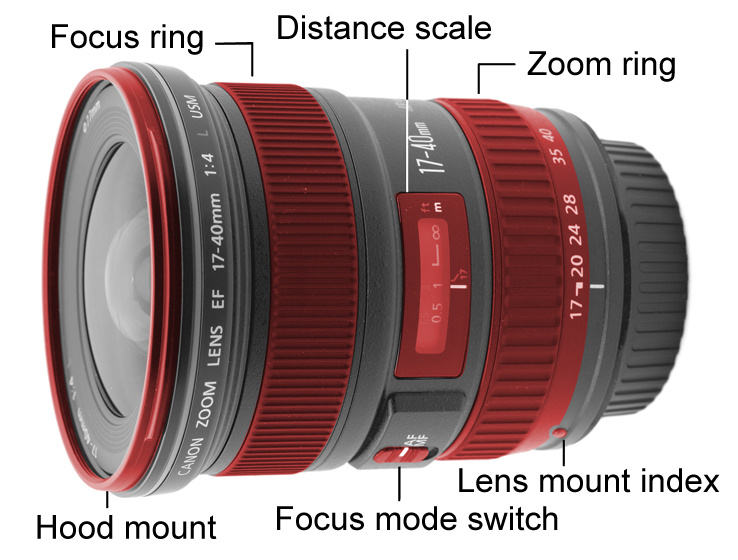
Canon EF lenses typically have a number of controls, switches and physical features, used by the photographer to control the lens. The types and number of the controls can vary from lens to lens. With the most basic lenses having only a few, to the most complex having over a dozen different controls and switches.
This is a list of the different controls and switches found on most Canon EF lenses, along with a detailed description on what they are used for.
Lens mount index: This raised, round red mark is found on all EF lenses. It is used for matching the EF lens mount to the mount on an EOS body, so one can connect the lens to the body quickly.
Focusing ring: This control, found on most EF lenses, is used for focusing the lens. It is usually a ring on the lens body, that can be turned.
Zoom ring: This control is found on most EF zoom lenses. It is used for changing the focal length of the lens. The zoom ring usually has certain, common, focal lengths marked on it. To set the zoom ring to any given focal length, one must turn the ring so that the marked focal length matches the zoom index. The zoom index is typically a white, or black, line found next to the zoom ring.
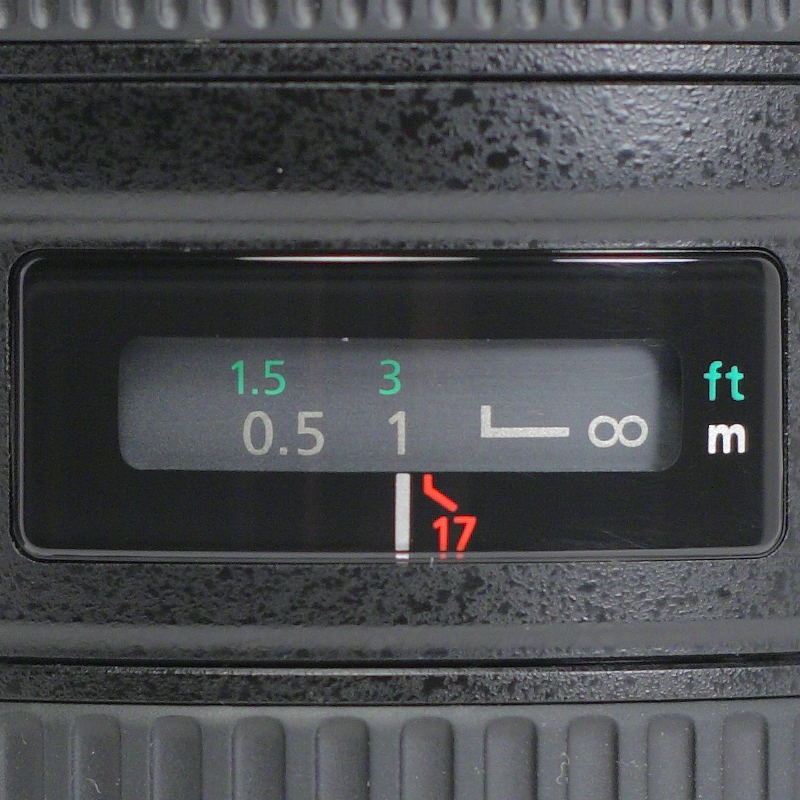
Distance scale window: This feature is found on many EF lenses. This feature, while not a control or switch, is useful to the photographer for determining, or setting, the lens's focus distance. It is used in conjunction with the Focusing ring. When rotated, the distance scale will also rotate to show the changing focus distance. On some lenses the distance scale also has an infrared index. These are shown as red markings below the distance scale. This is used for making focus adjustments when the photographer is doing infrared photography, as lenses typically focus infrared light at a different point than visible light, and therefore achieving correct focus using visible light will result in an out-of-focus infrared image. To make an adjustment, first focus the subject, then turn the Focusing ring so it matches the corresponding infrared index mark.

Focus mode switch: This switch is found on most EF lenses that have an autofocus feature. It is used for setting the lens to either autofocus mode, or manual focus. When set to autofocus mode (AF), the lens will autofocus when directed to by the camera. When set to manual focus (MF), the lens is focused using the Focusing ring. Some lenses support full-time manual focusing (FT-M), which allows the photographer to focus the lens manually even with the mode switch set to AF, without damaging the lens (as could happen if a lens without FT-M is manually focused while in AF mode).
Focusing distance range limiter switch: This switch is found on most longer focal length lenses, and macro lenses. It is used for limiting the focusing distance range of the lens when using it in autofocus mode. Most lenses have two settings; these are usually full focus range (from minimum focus distance to infinity), and distant focus range (from halfway point of focus range to infinity). Other lenses have three settings, with the additional setting usually being near focus range (from minimum focus distance to halfway point of focus range). Longer focal length lenses and macro lenses have a relatively long travel distance for the focusing mechanism inside the lens; this feature shortens the autofocus time. When the photographer knows they will not need a certain part of the focus distance range, limiting it will help shorten the autofocus time, and possibly prevent "focus hunting".
Soft focus ring: This ring is found only on the 135 mm 'Soft Focus' prime lens, and enables a variable soft focus effect from completely sharp (0) to very soft (2), although it has little effect when used with apertures over f/5.6. Although the ring can be set to any position, two 'stops' are implemented at positions 1 and 2.
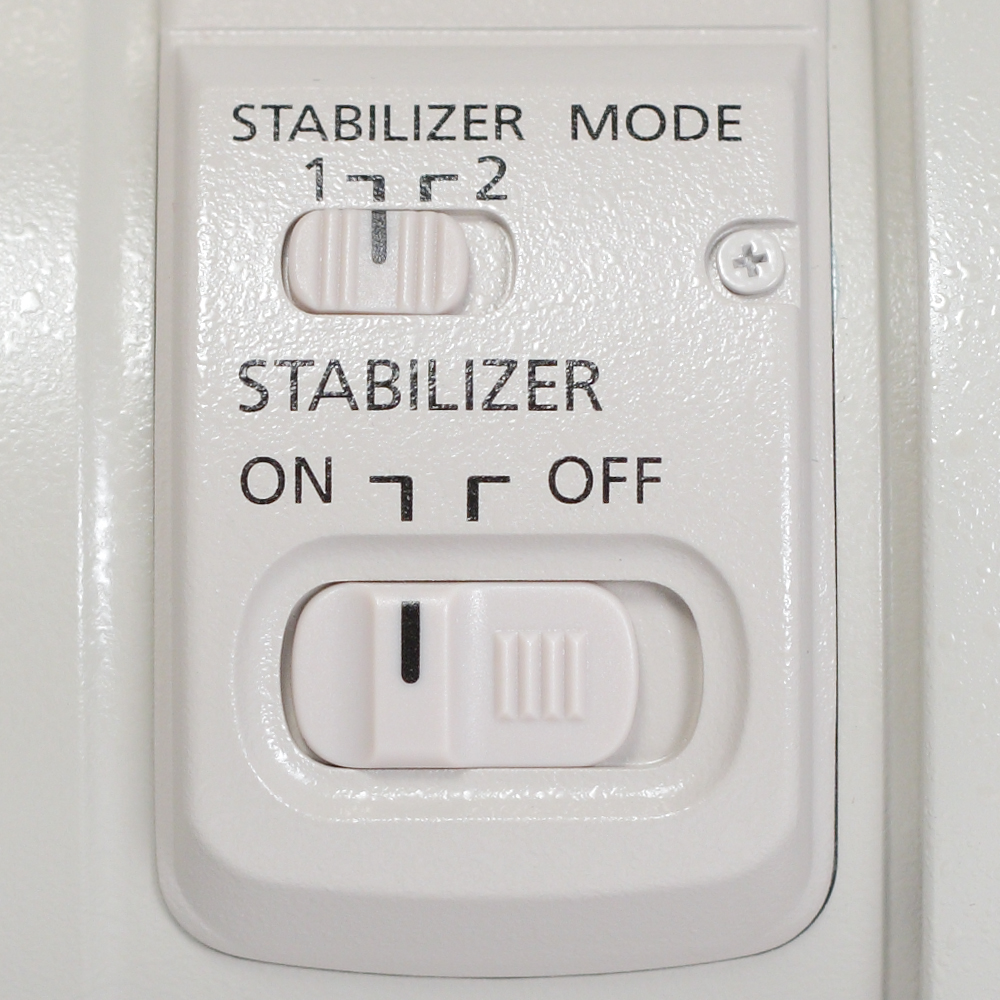
Image stabilizer switch: This switch is found on all EF lenses that feature an image stabilizer. It is used for turning the image stabilizer "on"( | ), or "off"( o ).
Image stabilizer mode switch: This switch is found on many EF lenses that feature an image stabilizer, particularly those of longer focal lengths. The switch has two settings on most lenses: Mode 1 and Mode 2. The newest IS Mark II versions of certain EF super telephoto lenses (the 300mm f/2.8L, 400mm f/2.8L, 500mm f/4L, and 600mm f/4L), plus the 200–400mm f/4L IS and 100–400mm f/4–5.6L IS II, have a third setting, Mode 3. Mode 1 is normal mode, used for typical photography, where the subject does not move. Mode 2 is used for panning; this is useful for sports or wildlife photography, where the subject moves constantly and one will need to pan. Mode 3, intended to track action, is similar to Mode 2 in that it ignores panning; however, it only applies stabilization when the shutter is released—the viewfinder image is not stabilized. One should not use Mode 1 for panning as this will typically cause blurred photographs; the image stabilizer will attempt to correct for all motion, including the panning motion, but cannot do so due to the limited range of motion of the IS mechanism. Older lenses that have an image stabilizer, but do not feature this switch, are permanently in Mode 1. Some newer lenses, such as the Canon EF-S 18-200mm lens, are able to detect if they are being panned in either axis and will automatically disable the stabilization for the axis parallel to movement and therefore do not require this switch.
Autofocus stop buttons: These buttons are found on some super telephoto EF lenses, evenly spaced around the front collar of the lens. They are used for temporarily stopping the autofocus feature of the lens. Only one button needs to be pressed to activate the feature. To use this button, one must first have the autofocus active, then when one wishes to halt autofocus, one presses and holds the button. To resume autofocus, one releases the button. Some newer bodies allow these buttons to be assigned to perform other functions; for instance, the Canon EOS 7D allows the photographer to set these buttons to perform any of six functions.
Focus preset: The focus preset feature is found on most super telephoto EF lenses. The focus preset feature uses one switch, one button, and one ring. It is used for presetting a given focus distance into memory, so that the photographer can quickly recall the focus distance, without the need for autofocus. The switch has three settings "off"( o ), "on"( | ), or "on with sound"( ((- ), and is used for turning on the feature, and deciding if sound is desired. The "set" button is used for saving the focus distance into memory. The focus preset ring is used for recalling the memory save point. It is a thin knurled ring, usually located in front of the Focusing ring. To use this feature, one must set the switch to either "on" or "on with sound", focus the lens to the desired distance, then press the "set" button. After this, when the feature is turned on, the photographer can turn the focus preset ring, and the lens will recall and focus quickly to the distance that was saved. This feature is useful for sports and birding photography (for instance, to allow rapid focusing on the goal or on a spot where the birds may perch).
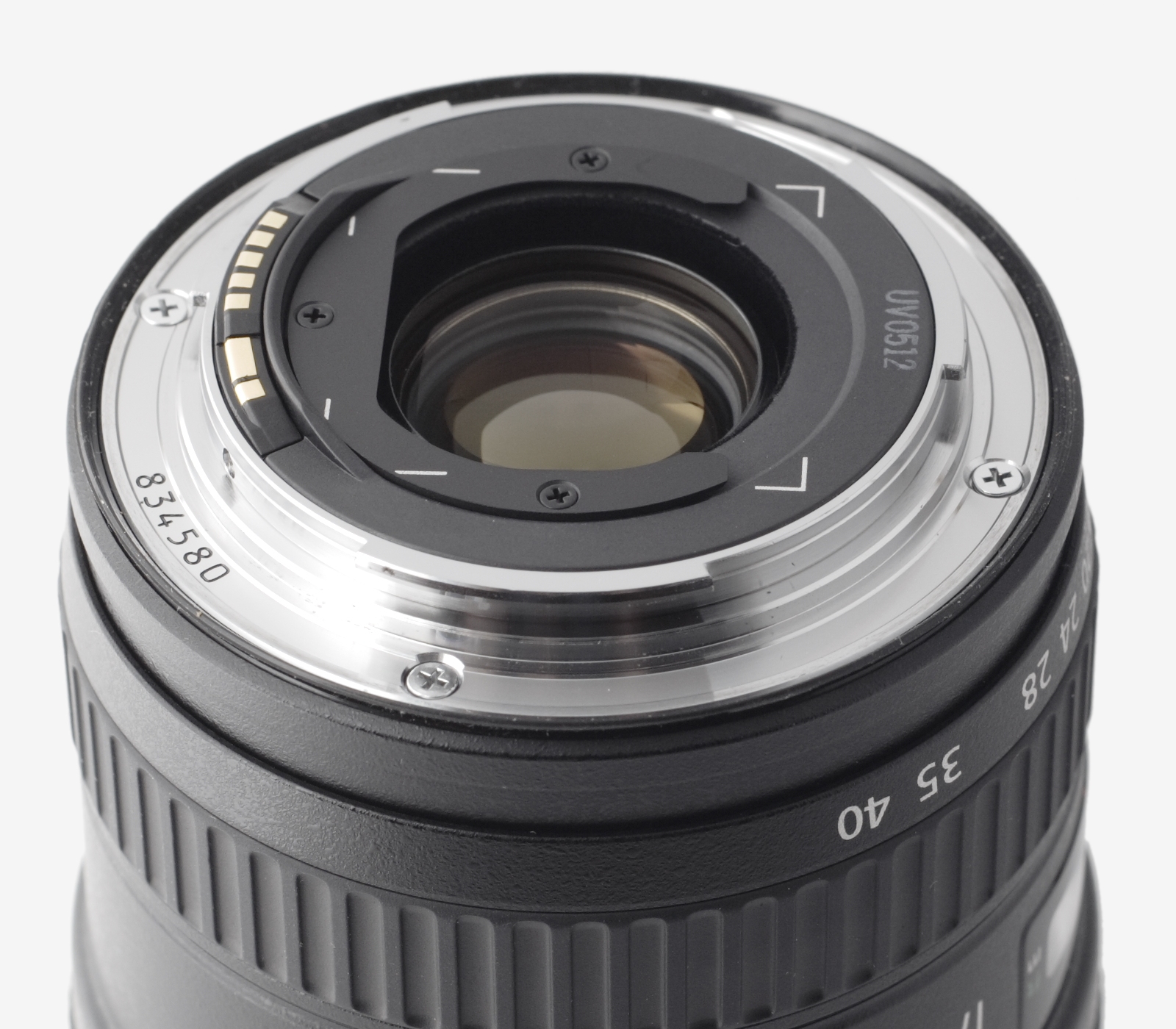
Filter mounting: This mount is used for attaching filters to EF lenses. There are three types: front threaded mount, inner drop-in mount, and rear gelatin holders. Front threaded filters are used on most lenses, and are attached by threading and tightening the filter. Inner, drop-in filter mounts are used on super telephoto EF lenses. They are attached by first pressing the two buttons on the filter mount, and pulling it out. Then either a round threaded filter is attached, or one can use a gelatin filter. Rear gelatin filter holders are used by cutting out a sheet of gelatin, to the size shown on the back of the lens and then sliding it into the holder. Filter mounts are useful for all types of photography, and every EF lens has either one or two of the three types used.
Lens hood mount: This feature is found on most EF lenses. This mount is used for attaching the lens hood. The hood mount is of a bayonet style on most EF lenses, though a clip-on style hood mount is used for a small selection of current lenses.
Tripod collar: This feature is found on most longer focal length lenses, and macro lenses. The tripod collar is used for attaching the tripod ring. There are two main styles of tripod rings. One type is opened up, placed on the lens' tripod collar, then closed and tightened. The other type does not open, but instead is slid up the lens from the mount end (which can only be done when the lens is not mounted on a camera body) and tightened. To set the tripod ring so that it is level with the lens, rotate the ring until the index mark on the tripod ring matches the index mark on the distance scale. The tripod ring is used for attaching a tripod/monopod near to the point of balance of the lens-body combination, more conveniently than the camera body. In the case of larger and heavier lenses, there is also less strain on the lens mount if the body is supported by the tripod-mounted lens than if the lens were to be supported by a tripod-mounted body.
Related technologies
Ultrasonic motor drive {{Anchor|Ultrasonic Motor drive|Ultrasonic Motor Drive}}

Ultrasonic motor (USM) lenses appeared with the introduction of the EF 300 mm 2.8L USM lens in 1987. Canon was the first camera maker to successfully commercialise the USM technology. EF lenses equipped with USM drives have fast, silent and precise autofocus operations, and consume less power compared to other AF drive motors.
There are three types of USMs: ring-type USM, micromotor USM, and Nano USM. Ring-type USM allows for full-time manual focus (FT-M) operations without switching out of AF mode. Micromotor USM is used to bring down the cost of the lens. It is possible to implement FT-M even with micromotor USM; however, it requires additional mechanical components, and the vast majority of micro-USM lenses do not offer such capability. Nano USM was introduced in 2016 with the release of Canon's latest iteration of the EF-S 18–135mm lens. It is intended to offer the AF speed of ring-type USM with the quietness of STM mechanisms (see below).
Some older USM lenses are identified with a gold ring and the word "Ultrasonic" printed in gold on the lens barrel. L lenses with USM don't have the gold ring, but they still have the word "Ultrasonic" printed on the lens barrel.
Stepping motor {{Anchor|Stepper motor|Stepping motor}}
.jpg)
Canon announced stepping motor (STM) lenses first in June 2012, alongside the EOS 650D/Rebel T4i/Kiss X6i.
Canon stated that this technology allows smooth and silent autofocus, and with compatible bodies (the first of which is the 650D) will provide continuous autofocus in live view and video. Unlike USM, STM lenses use focus-by-wire to enable full-time manual mode. Two main disadvantages are linked to focus-by-wire: First, the need to computationally process the input before the intended action is executed leads to a sometimes perceptible lag. Second, using the motor requires power, so when an STM lens is not connected to a camera or the camera is switched off, changing the focus is impossible.
All stepping-motor lenses are marked with the letters "STM" on the front of the lens as part of the model designation.
Image stabilizer {{Anchor|Image Stabilizer}}

The image stabilization (IS) technology detects handheld motion and optically corrects it. It only corrects handheld motion; if the subject of the photograph is moving, IS will not stop it. It also can only stabilize so much motion, ranging from two to five stops, depending on the specific IS in the lens. Canon has released several versions of the IS system, including the following:
- The first version, first used in the 75-300mm lens (1995), takes approximately one second to stabilize, provides approximately two stops of stability, is not suitable for use on a tripod, or for panning.
- The 300mm 4L IS USM lens, released in 1997, adds IS Mode 2, which detects whether panning is taking place horizontally or vertically, and only compensates for vibration in the plane perpendicular to the plane of panning.
- In 1999, with the release of the IS super-telephoto lenses (300mm 2.8L through 600mm 4L), tripod detection was added, so that the lens could be used on a tripod with IS turned on.
- In 2001, a new version of the Image Stabilizer was created for the 70–200mm 2.8L. This version takes approximately 0.5s and can be stabilized up to three stops.
- In 2006, the 70–200 mm 4L IS USM was released with an Image Stabilizer which allows up to four stops of stabilization.
- In 2008, the 200mm f/2L IS USM was released with a new version of IS which allows up to five stops of stabilization.
- In 2009, the 100 mm 2.8L Macro IS USM became the first Canon lens with a Hybrid Image Stabilizer. In addition to correcting angular movement, Hybrid IS also corrects for shift movement.
- In 2011, with the release of the 300mm 2.8L IS II and 400mm 2.8L IS II, IS Mode 3 was added. This mode is similar to Mode 2, except that stabilization is applied only when the shutter is released.
- Some newer lenses include an Image Stabilizer which can automatically detect whether the user is panning and respond accordingly, and therefore these lenses do not have an IS mode switch.
All EF lenses that support IS have the words "Image Stabilizer" written on the lens. On some of Canon's larger telephoto lenses, the words "Image Stabilizer" are etched onto a metal plate affixed to the lens.
Diffractive optics
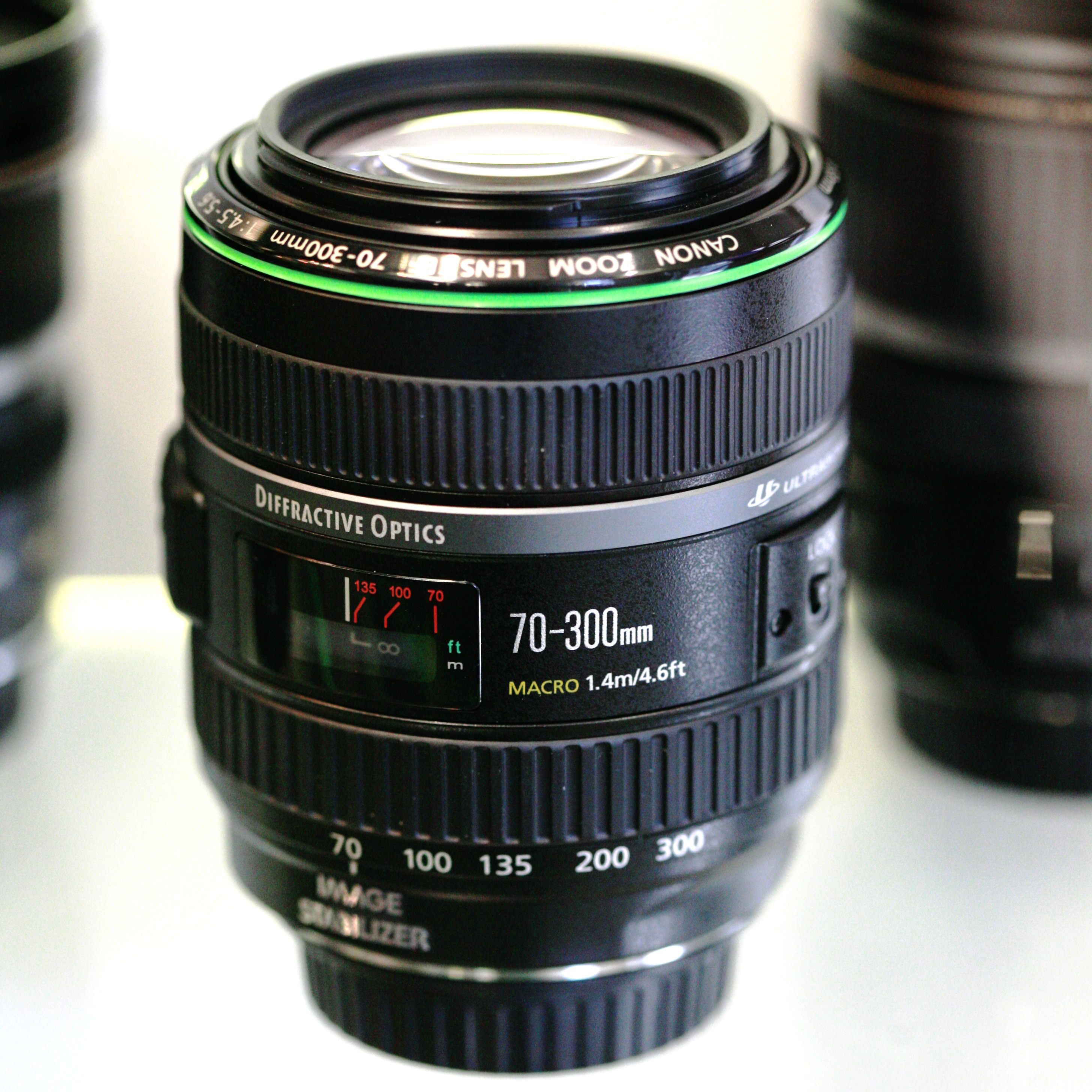
Diffractive optics (DO) are special lens elements that are used in some lenses. DO lenses are usually smaller and lighter and are better at handling chromatic aberration, compared to conventional lenses of similar focal length and aperture value. They are more expensive to make. Only the EF 400 mm 4 DO IS USM, its updated Mark II version, and the EF 70–300 mm 4.5–5.6 DO IS USM contain DO elements. DO lenses have a green ring on the barrel.
L-series lenses
Main article: Canon L lens
Top range Canon EF lenses are designated "L-series", or "Luxury" lenses.{{cite web |access-date = 1 August 2008 |url-status = dead |archive-url = https://web.archive.org/web/20090218004639/http://web.canon.jp/Imaging/eos/system/ef_lens_system-e.html |archive-date = 18 February 2009}} L series lenses are compatible with the full range of EF or EF-S mounts and, as they are aimed at the high-end user, most also include environmental or weather sealing and a constant maximum aperture. All L lenses are supplied complete with a hood and a pouch or case, which are not generally included with non-L lenses. Distinctive visual cues include a red ring around the lens and an off-white colour on longer-focal-length models. The latter also helps to reflect light and reduce heat absorption and subsequent internal expansion of lens components that can affect the image quality of long focal length lenses.
All L lenses include at least one fluorite, ultra-low-dispersion glass element, super ultra-low-dispersion glass element, and/or certain types of aspherical elements. (Note that a number of non-L lenses also use aspherical elements, and at least one non-L lens has a Super UD element.) Most L lenses feature an ultrasonic motor (USM) for focusing.
Timeline of innovations
In 1987 Canon was the first to use USM (Ultrasonic Motor) with the Canon EF 300mm f/2.8L USM.
In 1989 Canon was the first to create a full frame f/1.0 AF (AutoFocus) lens and the only one until today with the Canon EF 50mm f/1.0L USM.
In 1993 Canon was the first to create an interchangeable 10× superzoom lens for SLR cameras. That lens was Canon EF 35-350mm f/3.5-5.6L USM.
In 1993 Canon created the first Super UD (Ultra low Dispersion) lens with the Canon EF 400mm f/5.6L USM.
In 1995 Canon created the first lens with IS (Image Stabilization). That lens was the Canon EF 75-300mm f/4-5.6 IS USM.
Canon in 2001 was the first to create a lens with DO (multi layered Diffractive Optical element) element. That lens was the Canon EF 400mm f/4 DO IS USM.
Canon in 2008 created the first lens with SWC technology (Subwavelength Structure Coating). That lens was the Canon EF 24mm f/1.4L II USM.
Canon in 2009 created the first lens with Hybrid IS (Image Stabilization) which compensates both angle camera shake and shift camera shake with the Canon EF 100mm f/2.8L Macro IS USM.
Canon in 2010 was the first to create a lens with Fluoride coating. That lens was the Canon EF 70-300mm f/4-5.6L IS USM.
Canon in 2011 made the first fisheye zoom lens, both circular and rectangular. That lens was the Canon EF 8-15mm f/4L Fisheye USM.
Canon in 2012 made the first wide angle lens with Image Stabilization. That lens was the Canon EF 24mm f/2.8 IS USM.
Canon in 2013 created the first telephoto with built-in 1.4× extender. That lens was Canon EF 200-400mm f/4L IS USM Extender 1.4x.
Communication protocol
The communication protocol between the camera and the lens is 8-data-bit, 1-stop-bit SPI (mode 3). The pins, from right to left on the lens, are:
| Name | Function | Notes | ||
|---|---|---|---|---|
| url=http://photo.net/canon-eos-digital-camera-forum/005nXu | title=Photo.net: Canon EF focusing protocol | access-date=12 January 2009 | ||
| VBat | +6 V to power internal lens focus motors | [[File:Canon EF lens mount.jpg | 150px]] | |
| P-Gnd | Power ground | |||
| P-Gnd | ||||
| VDD | +5.5 V Digital logic power | |||
| DCL | Data from camera to the lens (MOSI) | |||
| DLC | Data from the lens to the camera (MISO) | |||
| LCLK | Camera body generated clock signal (SCLK, CPOL=1) | |||
| D-GND | Digital logic ground | |||
| COM1 | url=http://f20c.com/stuff/canon/partslist/EXTENDER%20EF%201.4X.PDF | title=Canon Extender EF 1.4x Parts Catalog | access-date=21 September 2018}}{{cite web | url = http://www.ozerki.net/photosight/PhotoDocs/Manuals/partlist/Lens/Life%20Size%20Converter%20EF.pdf |
| EXT0 | Short to COM1 for 'Life Size Converter' and 1.4× teleconverter | |||
| EXT1 | Short to COM1 for 2× and 1.4× teleconverter |
The information from the lens is used by the camera body for focusing and metering, and with digital camera bodies it is used to record the lens parameters in the Exif data in the images.
All L series primes 135mm or longer, the 400mm DO, the 70–200mm zooms, the 100–400mm zooms, the 200–400mm zoom and the 50mm Compact Macro have three additional communication pins. These additional pins are used by the Canon Extender EF adapters and the Life-Size Converter EF to indicate to the lens the change in focal length so that it is able to report the correct focal length and aperture to the camera body when mounted on a teleconverter. The lens also reduces autofocus speed when a teleconverter is attached to improve autofocus accuracy.
List of Canon EF lenses
The "I", "II", "III" Roman numeral suffix after the focal length(s) indicates the generation number. While I is used in the table below, it is not used in official Canon model numbers; the original model lacks a Roman numeral and only the second and subsequent generations have them. Roman numerals are used only when the entire model designation—focal length(s), aperture, IS, DO, L status, and motor mechanism—is identical from one version to the next. This means, for example, that when Canon introduced IS to lenses whose prior versions lacked that feature (24mm, 28mm, 35mm IS primes in 2012, 16–35mm IS zoom in 2014), the first IS versions lacked Roman numerals.
The EF lenses are grouped below by their focal lengths:
- Zoom: for zoom lenses that have a range of focal lengths
- Prime: for prime lenses that have a single focal length
Zoom
| Focal length | [](aperture) | USM | IS | [](canon-l-lens) | DO | Filter size | ||
|---|---|---|---|---|---|---|---|---|
| 8–15 mm(fisheye) | 4 | 2010 | ||||||
| 11–24 mm | 4 | 2015 | ||||||
| 16–35 mm I | 2.8 | 2001 | ||||||
| 16–35 mm II | 2.8 | 2007 | ||||||
| 16–35 mm III | 2.8 | 2016 | ||||||
| 16–35 mm IS | 4 | 2014 | ||||||
| 17–35 mm | 2.8 | 1996 | ||||||
| 17–40 mm | 4 | 2003 | ||||||
| 20–35 mm | 2.8 | 1989 | ||||||
| 20–35 mm | 3.5–4.5 | 1993 | ||||||
| 22–55 mm | 4-5.6 | 1998 | ||||||
| 24–70 mm | 2.8 | 2002 | ||||||
| 24–70 mm II | 2.8 | 2012 | ||||||
| 24–70 mm | 4 | 2012 | ||||||
| 24–85 mm | 3.5-4.5 | 1996 | ||||||
| 24–105 mm | 4 | 2005 | ||||||
| 24–105 mm II | 4 | 2016 | ||||||
| 24–105 mm STM | 3.5-5.6 | 2014 | ||||||
| 28–70 mm | 2.8 | 1993 | ||||||
| 28–70 mm II | 3.5-4.5 | 1988 | ||||||
| 28–80 mm | 2.8-4 | 1989 | ||||||
| 28–80 mm | 3.5-5.6 | 1996 | ||||||
| 28–80 mm II | 3.5-5.6 | 1999 | ||||||
| 28–80 mm I | 3.5-5.6 | 1991 | ||||||
| 28–80 mm II | 3.5-5.6 | 1993 | ||||||
| 28–80 mm III | 3.5-5.6 | 1995 | ||||||
| 28–80 mm IV | 3.5-5.6 | 1996 | ||||||
| 28–80 mm V | 3.5-5.6 | 1999 | ||||||
| 28–90 mm | 4-5.6 | 2000 | ||||||
| 28–90 mm II | 4-5.6 | 2003 | ||||||
| 28–90 mm III | 4-5.6 | 2004 | ||||||
| 28–105 mm | 3.5-4.5 | 1992 | ||||||
| 28–105 mm II | 3.5-4.5 | 2000 | ||||||
| 28–105 mm | 4-5.6 | 2002 | ||||||
| 28–135 mm | 3.5-5.6 | 1998 | ||||||
| 28–200 mm | 3.5-5.6 | 2000 | ||||||
| 28–200 mm | 3.5-5.6 | 2000 | ||||||
| 28–300 mm | 3.5-5.6 | 2004 | ||||||
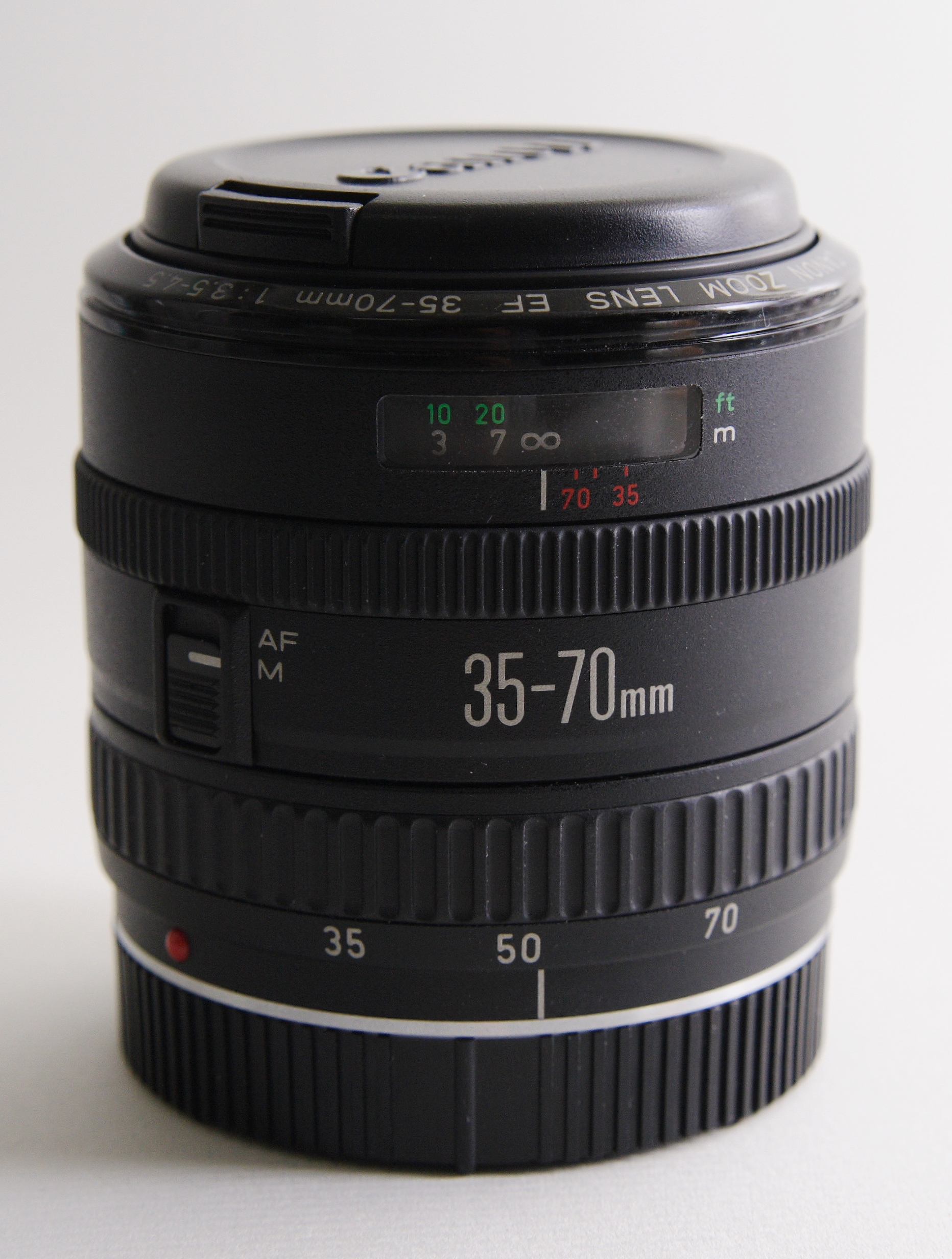
| 35–70 mm | 3.5-4.5 | 1987 | ||||||
| 35–70 mm | 3.5-4.5A | 1988 | ||||||
| 35–80 mm III | 4-5.6 | 1995 | ||||||
| 35–80 mm | 4-5.6 | 1992 | ||||||
| 35–80 mm Power Zoom | 4-5.6 | 1990 | ||||||
| 35–105 mm | 3.5-4.5 | 1987 | ||||||
| 35–105 mm | 4.5-5.6 | 1992 | ||||||
| 35–135 mm | 3.5-4.5 | 1988 | ||||||
| 35–135 mm | 4-5.6 | 1990 | ||||||
| 35–350 mm | 3.5-5.6 | 1993 | ||||||
| 38–76 mm | 4.5-5.6 | 1995 | ||||||
| 50–200 mm | 3.5-4.5 | 1987 | ||||||
| 50–200 mm | 3.5-4.5 | 1988 | ||||||
| 55–200 mm | 4.5-5.6 | 1998 | ||||||
| 55–200 mm II | 4.5-5.6 | 2003 | ||||||
| 70–200 mm | 2.8 | 2001 | ||||||
| 70–200 mm II | 2.8 | 2010 | ||||||
| url=https://www.usa.canon.com/internet/portal/us/home/about/newsroom/press-releases/press-release-details/2018/20180607-lens/20180607-lens | title=Canon Updates Lineup of EF L-Series Telephoto Zoom Lenses With the Introduction of EF 70-200MM F/4L II USM and EF 70-200MM F/2.8L IS II USM | website=usa.canon.com}} | 2.8 | 2018 | ||||
| 70–200 mm | 2.8 | 1995 | ||||||
| 70–200 mm | 4 | 2006 | ||||||
| 70–200 mm II | 4 | 2018 | ||||||
| 70–200 mm | 4 | 1999 | ||||||
| 70–210 mm | 3.5-4.5 | 1990 | ||||||
| 70–210 mm | 4 | 1987 | ||||||
| 70–300 mm | 4.5-5.6 | 2004 | ||||||
| 70–300 mm | 4-5.6 | 2005 | ||||||
| 70–300 mm | 4-5.6 | 2010 | ||||||
| 70–300 mm II | 4-5.6 | 2016 | ||||||
| 75–300 mm | 4-5.6 | 1991 | ||||||
| 75–300 mm II | 4-5.6 | 1995 | ||||||
| 75–300 mm III | 4-5.6 | 1999 | ||||||
| 80–200 mm | 2.8 | 1989 | ||||||
| 80–200 mm | 4.5-5.6 | 1992 | ||||||
| 80–200 mm II | 4.5-5.6 | 1990 | ||||||
| 90–300 mm | 4.5-5.6 | 2003 | ||||||
| 90–300 mm | 4.5-5.6 | 2002 | ||||||
| 100–200 mm | 4.5A | 1988 | ||||||
| 100–300 mm | 4.5-5.6 | 1990 | ||||||
| 100–300 mm | 5.6 | 1987 | ||||||
| 100–300 mm | 5.6 | 1987 | ||||||
| 100–400 mm | 4.5-5.6 | 1998 | ||||||
| 100–400 mm II | 4.5-5.6 | 2014 | ||||||
| 200–400 mm | 4 | 2013 |

Prime
| Focal length | [](aperture) | [](macro-photography) | USM | IS | [](canon-l-lens) | DO | Filter size | |
|---|---|---|---|---|---|---|---|---|
| 14 mm | 2.8 | 1991 | ||||||
| 14 mm II | 2.8 | 2007 | ||||||
| 15 mm | ||||||||
| (fisheye) | 2.8 | 1987 | ||||||
| 20 mm | 2.8 | 1992 | ||||||
| 24 mm | 1.4 | 1997 | ||||||
| 24 mm II | 1.4 | 2008 | ||||||
| 24 mm | 2.8 | 1988 | ||||||
| 24 mm IS | 2.8 | 2012 | ||||||
| 28 mm | 1.8 | 1995 | ||||||
| 28 mm | 2.8 | 1987 | ||||||
| 28 mm IS | 2.8 | 2012 | ||||||
| 35 mm | 1.4 | 1998 | ||||||
| 35 mm II | 1.4 | 2015 | ||||||
| 35 mm | 2 | 1990 | ||||||
| 35 mm IS | 2 | 2012 | ||||||
| 40 mm STM | 2.8 | 2012 | ||||||
| 50 mm | 1 | 1989 | ||||||
| 50 mm | 1.2 | 2006 | ||||||
| 50 mm | 1.4 | 1993 | ||||||
| 50 mm | 1.8 | 1987 | ||||||
| 50 mm II | 1.8 | 1990 | ||||||
| 50 mm STM | 1.8 | 2015 | ||||||
| 50 mm | 2.5 | 1987 | 0.5× magnification only. When paired with the "Life-Size Converter EF", a separate accessory, the lens provides up to 1.0× magnification but at the loss of infinity focus. | |||||
| 85 mm | 1.2 | 1989 | ||||||
| 85 mm II | 1.2 | 2006 | ||||||
| 85 mm IS | 1.4 | 2017 | ||||||
| 85 mm | 1.8 | 1992 | ||||||
| 100 mm | 2 | 1991 | ||||||
| 100 mm | 2.8 | 1990 | ||||||
| 100 mm | 2.8 | 2000 | ||||||
| 100 mm | 2.8 | 2009 | ||||||
| 135 mm | 2 | 1996 | ||||||
| 135 mm | ||||||||
| Soft Focus | 2.8 | 1987 | ||||||
| 180 mm | 3.5 | 1996 | ||||||
| 200 mm | 1.8 | 1988 | ||||||
| 200 mm | 2 | 2008 | ||||||
| 200 mm | 2.8 | 1991 | ||||||
| 200 mm II | 2.8 | 1996 | ||||||
| 300 mm | 1.8 | |||||||
| 300 mm | 2.8 | 1987 | ||||||
| 300 mm IS | 2.8 | 1999 | ||||||
| 300 mm IS II | 2.8 | 2010 | ||||||
| 300 mm | 4 | 1991 | ||||||
| 300 mm IS | 4 | 1997 | ||||||
| 400 mm | 2.8 | 1991 | ||||||
| 400 mm II | 2.8 | 1996 | ||||||
| 400 mm IS | 2.8 | 1999 | ||||||
| 400 mm IS II | 2.8 | 2011 | ||||||
| 400 mm IS III | 2.8 | 2018 | ||||||
| 400 mm | 4 | 2001 | ||||||
| 400 mm II | 4 | 2014 | ||||||
| 400 mm | 5.6 | 1993 | ||||||
| 500 mm | 4.5 | 1992 | ||||||
| 500 mm IS | 4 | 1999 | ||||||
| 500 mm IS II | 4 | 2011 | ||||||
| 600 mm | 4 | 1988 | ||||||
| 600 mm IS | 4 | 1999 | ||||||
| 600 mm IS II | 4 | 2011 | ||||||
| 600 mm IS III | 4 | 2018 | ||||||
| 800 mm | 5.6 | 2008 | ||||||
| 1200 mm | 5.6 | 1993 |
Exceptions
Canon has two further types of lenses compatible with the EF mount: Tilt-shift and the 1-5x Macro lens, which are not designated EF, but TS-E and MP-E respectively. TS stands for Tilt-shift while MP stands for macro-photo. These types of lenses are not designated EF as they are manual-focus only lenses. They do, however, retain electronic aperture control as well as focus confirmation.
Special
| Focal length | [](aperture) | Macro | USM | IS | [](canon-l-lens) | Tilt–Shift | Filter size |
|---|---|---|---|---|---|---|---|
| TS-E 17 mm | 4.0 | 2009 | |||||
| TS-E 24 mm | 3.5 | 1991 | |||||
| TS-E 24 mm II | 3.5 | 2009 | |||||
| TS-E 45 mm | 2.8 | 1991 | |||||
| TS-E 50 mm MACRO | 2.8 | 2017 | |||||
| MP-E 65 mm Macro | 2.8 | 1999 | |||||
| TS-E 90 mm | 2.8 | 1991 | |||||
| TS-E 90 mm Macro | 2.8 | 2017 | |||||
| TS-E 135 mm MACRO | 4.0 | 2017 |
Notes
References
- Markerink, Willem-Jan. Camera Mounts & Registers. Retrieved on 6 November 2005.
- tiffen.com. Lens To Filter Chart. For list of filter sizes.
References
- (2011-10-05). "The EF lens mount".
- Eric Reagan. (30 April 2014). "Canon Surpasses 100 Million EF Lenses Produced". Photography Bay.
- W.J. Markerink maintains an article on ''Camera Mounts & Registers'' which gives much more detail about flange focal distances and lens compatibility.
- (23 July 2012). "Put Your Creativity into Motion with the New EOS M Digital Camera". Canon U.S.A., Inc..
- Carnathan, Bryan. (10 November 2011). "Canon EF 300mm f/2.8 L IS II USM Lens Review". The-Digital-Picture.com.
- Carnathan, Bryan. "Canon EF 400mm f/2.8 L IS II USM Lens Review". The-Digital-Picture.com.
- Carnathan, Bryan. (26 September 2012). "Canon EF 500mm f/4 L IS II USM Lens Review". The-Digital-Picture.com.
- Carnathan, Bryan. (27 September 2012). "Canon EF 600mm f/4 L IS II USM Lens Review". The-Digital-Picture.com.
- Carnathan, Bryan. (November 18, 2013). "Canon EF 200-400mm f/4 L IS USM Extender 1.4x Lens Review". The-Digital-Picture.com.
- (10 November 2014). "Canon U.S.A. Introduces New Super-Telephoto Zoom Lens, The Compact And Highly Mobile Canon EF 100-400mm f/4.5-5.6L IS II USM". Canon U.S.A..
- (2012-06-08). "The New EOS Rebel T4i DSLR Camera Puts The Power And Creativity of DSLR Stills And Video at Your Fingertips". Canon U.S.A., Inc..
- "EF70-200mm f/4L IS USM". Canon.
- "Canon Camera Museum 124; Technology Hall". Canon.com.
- "Canon announces the arrival of the first EF lens to feature Hybrid IS". Dpreview.com.
- "New Canon Hybrid IS world's first Image Stabilizer to compensate for two types of camera shake". Dpreview.com.
- "Lenses: Black or white lenses?".
- "75 years of optics - Explore the world of Canon optics".
- "Canon Extender EF 1.4x Parts Catalog".
- "Canon Extender EF 2.0x Parts Catalog".
- "Canon Updates Lineup of EF L-Series Telephoto Zoom Lenses With the Introduction of EF 70-200MM F/4L II USM and EF 70-200MM F/2.8L IS II USM".
- Canon. "Canon EF 70-300mm f/4-5.6L IS USM Specification".
- Canon. "EF 70-300mm f/4-5.6 IS II USM".
- (29 August 2017). "Canon U.S.A. Expands Its Lens Portfolio with the New EF 85mm F/1.4L IS USM Lens And Their First-Ever Macro Tilt-Shift Lenses". Canon U.S.A., Inc..
This article was imported from Wikipedia and is available under the Creative Commons Attribution-ShareAlike 4.0 License. Content has been adapted to SurfDoc format. Original contributors can be found on the article history page.
Ask Mako anything about Canon EF lens mount — get instant answers, deeper analysis, and related topics.
Research with MakoFree with your Surf account
Create a free account to save articles, ask Mako questions, and organize your research.
Sign up freeThis content may have been generated or modified by AI. CloudSurf Software LLC is not responsible for the accuracy, completeness, or reliability of AI-generated content. Always verify important information from primary sources.
Report