From Surf Wiki (app.surf) — the open knowledge base
Apple Remote
Remote control introduced by Apple Inc
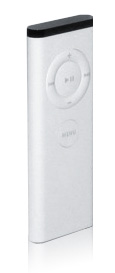
Remote control introduced by Apple Inc
| Field | Value | |
|---|---|---|
| name | Apple Remote | |
| developer | Apple Inc. | |
| type | Infrared remote | |
| photo | [[File:Apple TV Remote.jpg | 250px]] |
| caption | The second-generation Apple Remote, released in October 2009 | |
| first_release_date | October 12, 2005 (first generation) | |
| October 20, 2009 (second generation) | ||
| successor | Siri Remote |
the Apple IR remote control
October 20, 2009 (second generation) The Apple Remote is a remote control introduced in October 2005 by Apple Inc. for use with a number of its products with infrared capability. It was originally designed to control the Front Row media center program on the iMac G5 and is compatible with many subsequent Macintosh computers. The first three generations of Apple TV used the Apple Remote as their primary control mechanism. It has now been replaced with the Siri Remote in the fourth generation. Prior to the Apple Remote, Apple produced several nameless IR remotes for products such as the Macintosh TV, TV tuner expansion boards, and the PowerCD drive.
Design
Plastic (2005)
The original Apple Remote was designed with six buttons and made of white plastic. Its shape and layout resembled the first-generation iPod Shuffle. A circular Play/Pause/Select button sat in the center of a larger four-button circle (clockwise): Volume Up, Next/Fast-forward, Volume Down, and Previous/Rewind. A separate Menu button was positioned below. Size - 83328 mm. The price was set at US$29.00.
Aluminum (2009)

In October 2009, the remote was redesigned as a thinner and longer aluminum version. The new remote was released along with the 27- inch aluminum iMacs and multi-touch Magic Mouse. The Play/Pause button was moved out of the center of the directional buttons and put beside the Menu button (under the directional buttons). The symbols for the Volume Up/Down and Next/Fast-forward buttons were replaced with small dots, to make it clear that the buttons were also used to move up, down, left, and right within menus. Along with the new design, the price was dropped to US$19.99. In earlier aluminum remotes, the navigation ring was flush with the curvature of the remote's aluminum body. In the later revision, the ring is slightly raised to make it easier to locate the ring by touch.
Replacement of the CR2032 battery in the original remote is done with a small pointed object such as a paper clip at the bottom right edge of the device, where the battery slides out on a tray. The newer version has the battery located behind a compartment in the middle of the device which is accessed by turning a coin in the compartment door's indent.
Functions
The Apple Remote's original function was to enable navigation in Front Row, which allows users to browse and play music, view videos (DVDs and downloaded files) and browse photos. Although Front Row was removed from OS X 10.7 and later, some Apple software still works with the remote. It can still be used to control presentations in Apple Keynote, slide shows in iPhoto and Aperture, DVD films via DVD Player, and to play video, and audio in iTunes and QuickTime. Other software that is still compatible includes Elgato's EyeTV 3.5, and VLC media player. The remote can also be used to run presentations in Microsoft PowerPoint 2008.
Other functions controlled by the remote can include putting a device into sleep mode, selecting a partition to boot from on startup, and ejecting optical discs. A device can be configured to respond only to a particular remote.
iPods
An iPod placed in a dock featuring an IR sensor can be used with the remote for music and media control. The iPod's menus cannot be operated with the remote. The Apple Remote can also be used to control the iPod Hi-Fi or third-party devices tailored to it.
Boot Camp
Starting with Boot Camp 1.2, the remote has some functionality when a user is running Windows. If iTunes is installed on the Windows partition, pressing the Menu button on the remote will start the program. The remote's media controls also support Windows Media Player, as well as system volume control. Other third-party programs may also utilize the remote's capabilities; media applications such as foobar2000 and Media Player Classic allow users to control their functions via the remote. Applications must be in focus for the remote to control them. Boot Camp 5, released on March 14, 2013, also includes drivers for the remote control.{{cite web|title=Boot Camp 5: Frequently asked questions
iOS app
Main article: iTunes Remote
Apple offers a free 'Remote' app for iOS devices (available in the Apple App Store) which allows for wireless control of iTunes on Mac/Windows computers or the Apple TV.
Siri Remote
Main article: Siri Remote
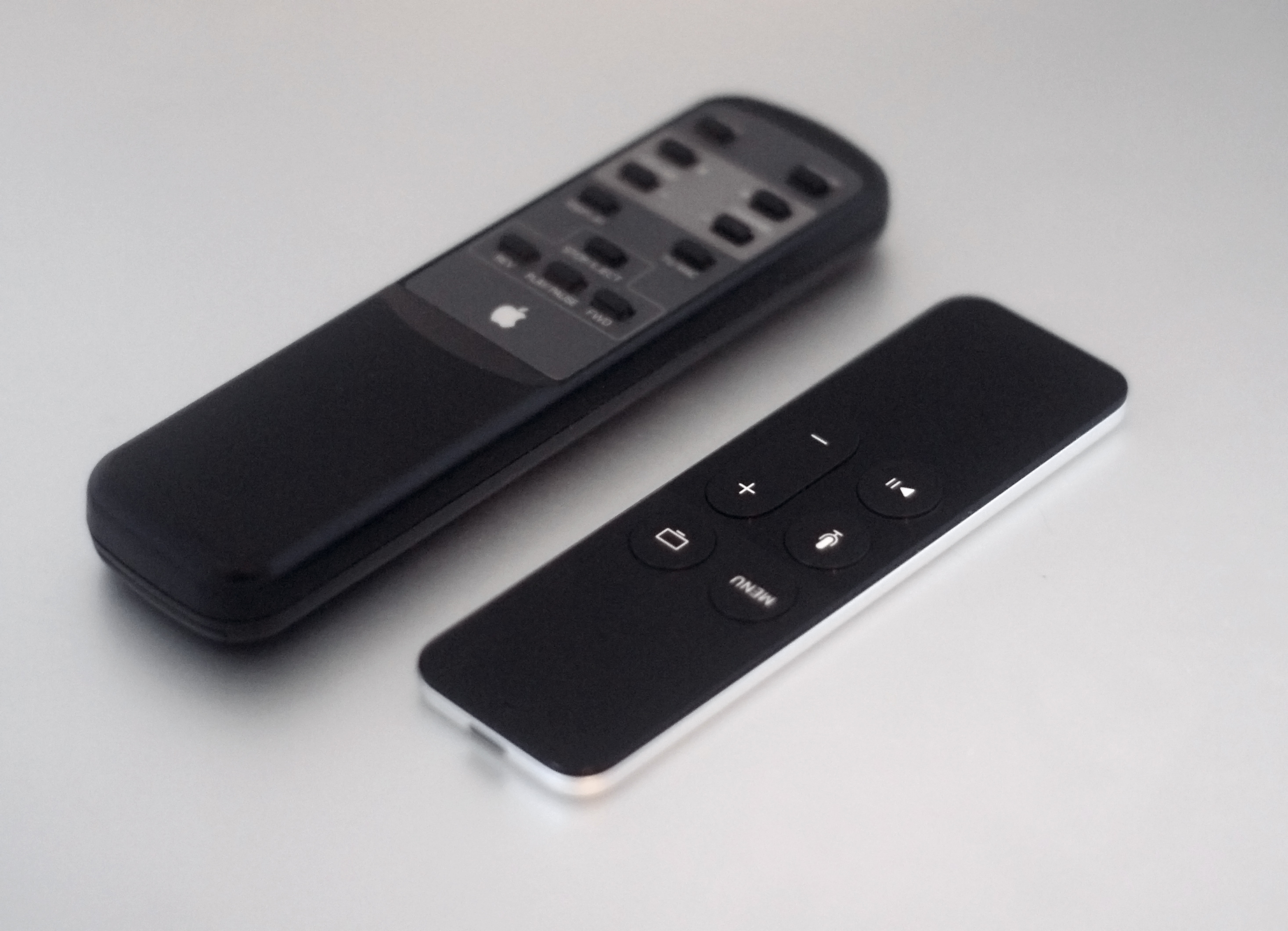
The Siri Remote was launched with the 4th generation Apple TV in 2015. It uses both IR and Bluetooth to communicate with the Apple TV. The remote has a trackpad, dual microphones, five buttons for menu, home, Siri and play/pause, and a volume up/down rocker button. Additionally it has an accelerometer (IMU) and a gyroscope{{cite web|url=https://developer.apple.com/tvos/human-interface-guidelines/remote-and-controllers/|title=Siri Remote and Game Controllers - tvOS Human Interface Guidelines
On September 12, 2017, together with the Apple TV 4K, Apple announced an updated Siri Remote, with a raised white border around the menu button and additional motion input for apps.
Compatibility

| Model | Compatibility | |
|---|---|---|
| MacBook | ||
| MacBook Air | ||
| MacBook Pro | ||
| iMac | ||
| Mac mini | ||
| Mac Pro | ||
| Mac Studio |
Earlier models of the iMac with polycarbonate enclosures featured a magnetic rest for the remote, which was later removed.
Use with new MacBook Airs, Retina MacBook Pros and older Macs
Using the Apple Remote with newer MacBook Air, Retina MacBook, or other Mac models without a built-in IR receiver requires a USB-based infrared receiver and additional software from a third party.
Using Remote Buddy (from IOSPIRIT GmbH) or mira (from Twisted Melon), it is possible to connect an external USB receiver such as the Windows Media Center Edition eHome receiver, and use the Apple Remote on these machines with full support for sleep, pairing, low-battery detection and controlling a variety of Apple and third-party software. In addition, Remote Buddy is able to emulate events of an Apple Remote on these systems, enabling users to use software written for the Apple Remote in exactly the same way as with Macs that have a built-in infrared receiver.
For the Apple computers without built-in infrared receiver, there exists a miniature USB receiver (USB-A or USB-C versions), the SmartGUS, which allows to retrofit the infrared functionality to iMac, MacBook and Mac Pro. In this case, all compatible software (iTunes, Keynote, PowerPoint, OpenOffice Impress, QuickTime Player, iPhoto, VLC, Kodi, Remote Buddy, Mira ...) can use the features of the Apple Remote, the same as with the legacy built-in infrared receiver. Using the Apple Remote with a USB receiver on Apple Silicon-based Macs requires installation a third-party software utility which simulates keyboard input.
Infrared interference
Because many electrical appliances use infrared remote (IR) controls, concurrent use of the Apple Remote with other IR remotes may scramble communications and generate interference, preventing stable use. Remotes should be used individually to circumvent the problem.
Technical details

The Apple Remote uses a modified NEC IR protocol which consists of a differential PPM encoding on a 1:3 duty cycle 38 kHz 950 nm infrared carrier. There are 32 bits of encoded data between the AGC leader and the stop bit:
| Protocol | on (μs) | off (μs) | total (μs) | leader | 9000 | 4500 | 13500 | 0 bit | 560 | 560 | 1120 | 1 bit | 560 | 1690 | 2250 | stop | 560 | 560 |
|---|
The first two bytes sent are the Apple custom code ID (0xEE followed by 0x87), which are followed by a one byte command and a one byte remote ID (0-255) making a total of 32 bits of data. All bytes are sent least significant bit first. The least significant bit of the command byte is a parity bit over the command byte and the ID byte. The commands consist of:
| Value | Button | Command |
|---|---|---|
| 0x01 | Menu | Menu |
| 0x2e followed by 0x02 | Center | Select |
| 0x03 | Right | Next/Fast-Forward |
| 0x04 | Left | Previous/Rewind |
| 0x05 | Up | Volume Up |
| 0x06 | Down | Volume Down |
| 0x2f followed by 0x02 | Play/Pause | Play/Pause |
The aluminium Apple remote control has 7 buttons; the extra button is a play/pause button and sends the same code as the center button. However, both these buttons prepend their code with another 32 bit sequence containing the commands 0x2f and 0x2e, respectively.
References
References
- "VERY RARE - REMOTE for the Black Apple Computer Macintosh TV - RMC-A1 1993".
- "Apple Macintosh Performa TV Tuner Board 820-0549-A Power Mac Video Capture Card".
- "VINTAGE Apple RK6934/321 PowerCD CD Drive Player Remote Control w/ Batteries".
- (October 21, 2005). "Apple Computer Universal Dock and Apple Remote".
- (June 6, 2008). "How to replace the Apple Remote battery". [[Apple Inc.]].
- (March 23, 2009). "Startup Manager: How to select a startup volume". [[Apple Inc.]].
- (November 24, 2009). "Pairing your Apple Remote with your computer". [[Apple Inc.]].
- (May 3, 2010). "Pairing the Apple Remote with the iPod Universal Dock". [[Apple Inc.]].
- (April 14, 2008). "Using the Apple Remote with iPod Hi-Fi". [[Apple Inc.]].
- "Boot Camp Installation & Setup Guide". Apple.
- "Use your Siri Remote or Apple TV Remote with Apple TV (4th generation)". Apple Inc..
- "Charge your Siri Remote or Apple TV Remote". Apple Inc..
- "Use Siri on your Apple TV (4th generation)". Apple Inc..
- "What Remotes Are Compatible with a MacBook?".
- "Remote Buddy Supported Hardware". IOspirit.
- (August 13, 2007). "iMac (Mid 2007): No Remote rest for Apple Remote". [[Apple Inc.]].
- "Apple Remote Receiver: GUSDevices FAQ".
- "Apple Remote Utility".
- (March 22, 2007). "Apple TV: IR interference can prevent your remote from working". [[Apple Inc.]].
- "Search {{pipe".
- Callendrello, Casey. (October 11, 2008). "Apple Remote library for Arduinio". caseyc.net.
- (May 17, 2012). "Apple Remote". Hifiduino blog at wordpress.
This article was imported from Wikipedia and is available under the Creative Commons Attribution-ShareAlike 4.0 License. Content has been adapted to SurfDoc format. Original contributors can be found on the article history page.
Ask Mako anything about Apple Remote — get instant answers, deeper analysis, and related topics.
Research with MakoFree with your Surf account
Create a free account to save articles, ask Mako questions, and organize your research.
Sign up freeThis content may have been generated or modified by AI. CloudSurf Software LLC is not responsible for the accuracy, completeness, or reliability of AI-generated content. Always verify important information from primary sources.
Report