From Surf Wiki (app.surf) — the open knowledge base
Abort, Retry, Fail?
Computer error message
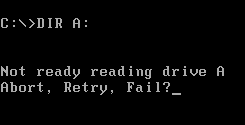
Computer error message
the error message
"Abort, Retry, Fail?" (or "Abort, Retry, Ignore?") is an error message found in DOS operating systems, which prompts the end-user for a course of action to follow. Although an improvement over CP/M, the message has been cited as an example of poor usability in computer user interfaces.
Background
In CP/M, attempting to read a floppy disk drive with the door open would hang until a disk was inserted and the disk drive door was closed (very early disk hardware did not send any kind of signal until a disk was spinning, and a timeout to detect the lack of signal required too much code on these tiny systems). Many users of CP/M became accustomed to this as a method of managing multiple disks, by opening the disk drive to stop a program from reading or writing a file until the correct disk could be inserted.
A primary design consideration for PC DOS was that software written for CP/M be portable to DOS without changes. Even the first IBM PC had hardware that told the operating system that the disk drive door was open, but returning an error to software would require the software to be rewritten to handle the error. Still, it was desirable to improve the experience, in particular by giving the user a way to get out of the hang without having to find a disk to insert in the drive. The prompt was invented for this reason.
Similarly, CP/M would repeatedly read or write a disk sector as long as there was an error. Often the only way out of this was to change the disk to another (it would then read something random off the new disk). The prompt was reused to provide a way to stop this as well.
Description
A missing disk, disk drive door opened, or checksum error while reading a disk were defined by DOS as "critical errors" and would call the "critical error handler". The default "critical error handler" was part of COMMAND.COM and printed the "Abort, Retry, ..." prompt, then waited for user input. Users could press a key to indicate what they wanted to happen; available options included:
- Abort (A): Terminate the operation or program, and return to the command prompt. The program would not do any cleanup (such as completing writing of other files).
- Retry (R): Attempt the operation again. "Retry" was what the user did if they could fix the problem by inserting a disk and closing the disk drive door. On early hardware, retrying a disk read error would sometimes be successful, but as disk drives improved, this became far less likely.
- Ignore (I): Only appeared for disk read errors. Return success status and whatever data was in the read buffer (which might contain some of the correct data).
- Fail (F): Starting with MS-DOS/PC DOS 3.3, "Fail" returned an error code to the program, similar to a "file not found" error. The program could then gracefully recover, perhaps asking the user for a different file name. This removed the biggest problem with the prompt (which earlier was "Abort, Retry, Ignore?") by providing an option that did not crash the program or repeat the prompt.
A program could install its own "critical error handler" while running, and many of the more sophisticated programs (in particular full screen programs) did so in order to avoid the messages disturbing the display. Some programs faked the missing "Fail" response in DOS 2.0 by jumping back to the calling program, skipping the return stack in DOS. This was a risky hack as it relied on the stack layout and skipped cleanup operations in the operating system.
MS-DOS 6.22 contained a singular case where the only option was "(R) Retry": when flushing the hard disk write-behind cache could not be completed. The user may attempt to repeat the write until successful or power off the system.
Usability
The error message has been described as being an example of poor user interface design. In almost all cases 'R' would just repeat the message, while all other letters caused the equivalent of a crash of the program and all work to be lost. In later versions 'Fail' would sometimes not crash the program. The scholar Mireille Hildebrandt described it this way:
Modern systems
Hard disks and larger removable media such as Zip drives made the need to manage multiple disks per drive obsolete, and thus made the prompt useless. It was gradually replaced with code that acted like "Fail" immediately. DOS 3.3 COMMAND.COM provided the startup option /F to force the default critical error handler to return "Fail" on all errors. Starting with version 4.0, the alternative command line processors 4DOS and NDOS supported /F and the corresponding CritFail=Yes directive in 4DOS.INI/NDOS.INI as well. The option was also supported by the COMMAND.COM of PTS-DOS 6.51 and S/DOS 1.0, as well as by DR-DOS 7.02 and higher. In OpenDOS 7.01, COMMAND.COM provides a similar feature with /N (described as "do not install a critical error handler") which is still supported in newer versions. Most other operating systems, such as Linux, always act like "Fail" in all cases.

In popular culture
- Humorous variations of Edgar Allen Poe's The Raven using "Abort, Retry, Ignore?" in place of "nevermore" were written in the 1980s and 1990s and were quite popular, distributed by bulletin board and email. The original and best known version has been credited to Cleveland poet Marcus Bales.
- In 1993, Neil Howe published 13th Gen: Abort, Retry, Ignore, Fail?, a sympathetic book about the culture of Generation X.
- In 1996, White Town released an EP entitled Abort, Retry, Fail?_.
- PC Magazine has used the term as the title of its column highlighting humorous computer-related errors.
References
References
- (November 1982). "CP/M-86 And MS-DOS: A Comparative Analysis". [[Software Communications, Inc.]].
- (29 September 1996). "The Art of Assembly Language Programming".
- (16 November 2006). "Action Taken on Abort, Retry, Ignore, Fail". [[Microsoft]].
- (23 May 2013). "Human Law and Computer Law: Comparative Perspectives". [[Springer Science & Business Media]].
- "Midnight Dreary - GNU Project - Free Software Foundation".
- "Abort, Retry, Ignore - Poe Puree".
- "Three Parodies of The Raven".
- (1993). "13th Gen: Abort, Retry, Ignore, Fail?". [[Vintage Books]].
- (1997). "Abort, Retry, Fail?_ Your Woman". [[discogs]].
- (3 May 2006). "PC Magazine's Extreme Makeover".
This article was imported from Wikipedia and is available under the Creative Commons Attribution-ShareAlike 4.0 License. Content has been adapted to SurfDoc format. Original contributors can be found on the article history page.
Ask Mako anything about Abort, Retry, Fail? — get instant answers, deeper analysis, and related topics.
Research with MakoFree with your Surf account
Create a free account to save articles, ask Mako questions, and organize your research.
Sign up freeThis content may have been generated or modified by AI. CloudSurf Software LLC is not responsible for the accuracy, completeness, or reliability of AI-generated content. Always verify important information from primary sources.
Report