From Surf Wiki (app.surf) — the open knowledge base
MacBook (2006–2012)
Line of notebook computers by Apple
Line of notebook computers by Apple
| Field | Value | |
|---|---|---|
| name | MacBook | |
| developer | Apple | |
| family | MacBook | |
| type | Subnotebook | |
| release date | ||
| os | macOS | |
| cpu | {{flat list | |
| display | 13.3 in widescreen LCD, 1280 × 800 pixel resolution | |
| successor | 12-inch MacBook | |
| predecessor | iBook | |
| related | {{flat list | |
| logo | MacBook (2006-2012) product title.png | |
| image | MacBook LMSD Issue 2009.jpeg | |
| caption | A 2009 model MacBook |
MacBooks released from 2006 to 2012
- Intel Core Duo
- Intel Core 2 Duo
MacBook Air
- 12-inch MacBook
- MacBook Pro
The MacBook is a line of Mac laptops sold by Apple between May 2006 and February 2012. It replaced the iBook series of notebooks as a part of Apple's transition from PowerPC to Intel processors. Positioned as the low end of the MacBook family, below the premium ultra-portable MacBook Air and the performance-oriented MacBook Pro, the MacBook was aimed at the consumer and education markets. It became the best-selling Mac in Apple's history. For five months in 2008, it was the best-selling laptop of any brand in US retail stores.
There have been three separate designs of the original MacBook. The original design used a combination of polycarbonate and fiberglass casing which was modeled after the iBook G4. The second design, introduced in October 2008 alongside the 15 in MacBook Pro, shared the latter's unibody aluminium casing, but lacked a FireWire port. A third design, introduced in late 2009, retained a similar unibody construction but lacked a FireWire port and changed back to white polycarbonate.
On July 20, 2011, the MacBook was discontinued for consumer purchase, as it had been effectively superseded by the MacBook Air, which had a lower entry price. Apple continued to sell the MacBook to educational institutions until February 2012. A new line of computers by the same name was released in 2015, serving the same purpose as an entry-level laptop.
Polycarbonate (2006–2009)
Polycarbonate MacBook
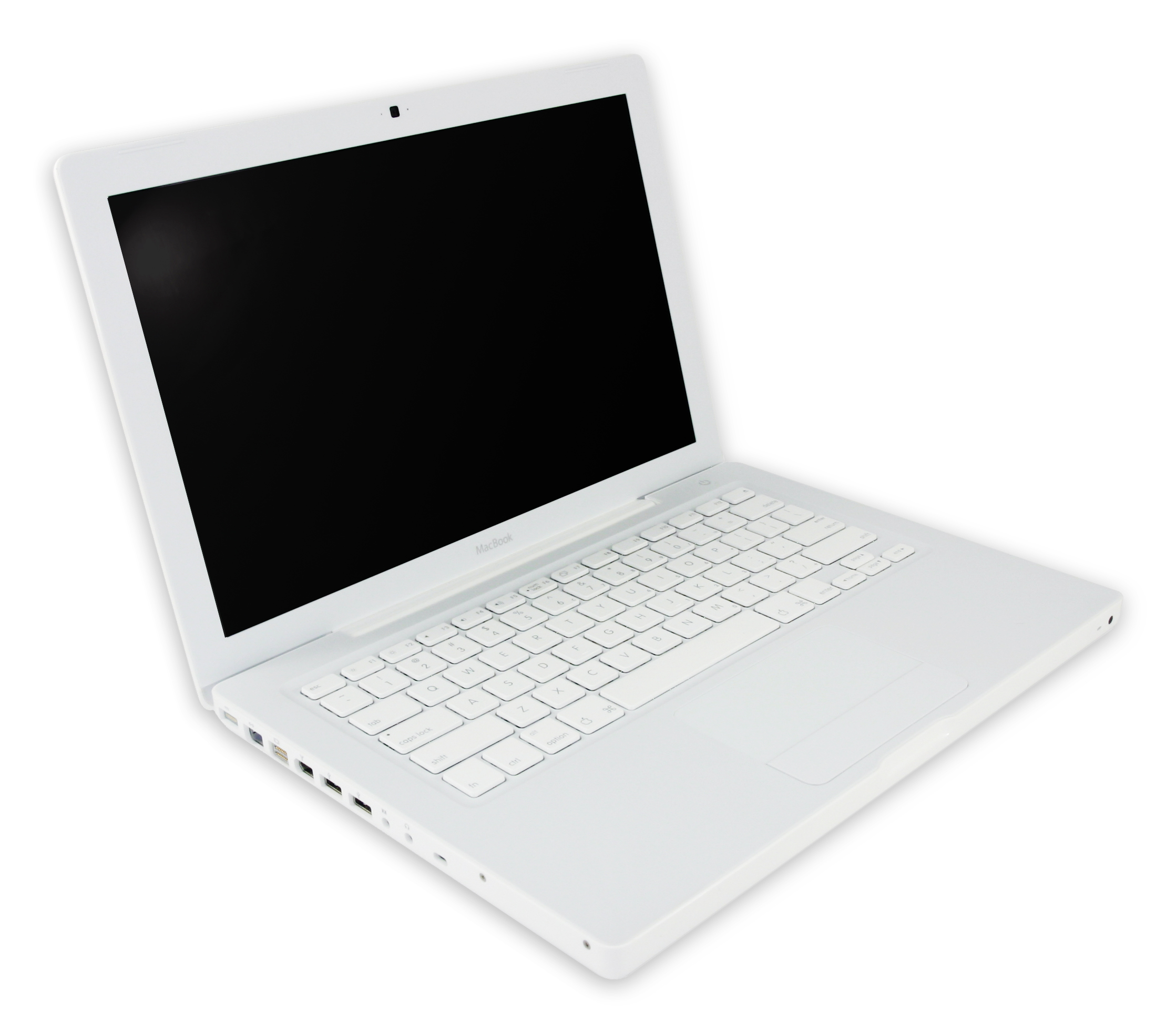
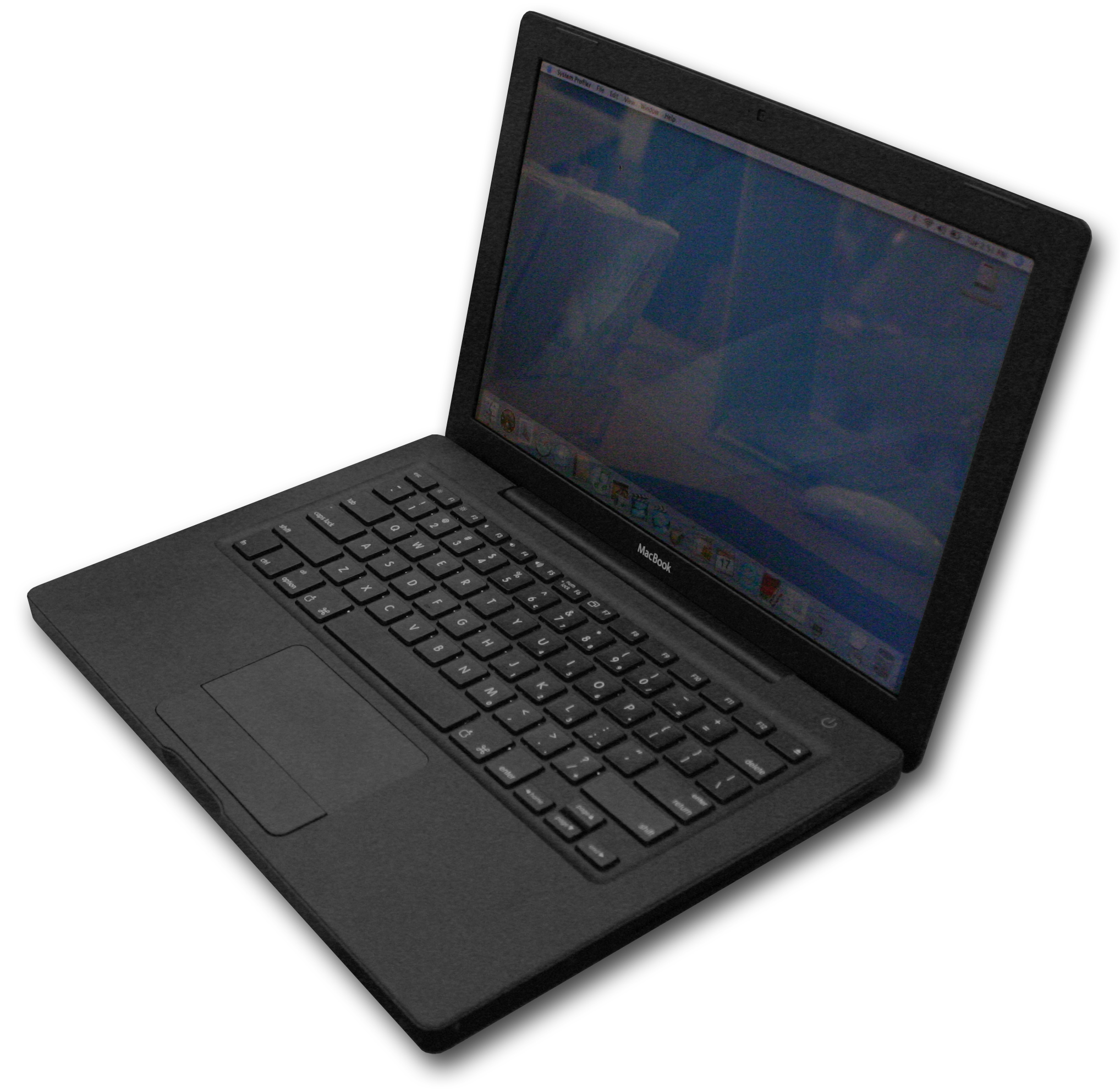
The original MacBook, available in black or white colors, was released on May 16, 2006, and used the 32-bit Intel Core Duo processor and 945GM chipset, with Intel's GMA 950 integrated graphics on a 667 MHz front side bus. Later revisions of the MacBook moved to the 64-bit Core 2 Duo processor and the GM965 chipset, with Intel's GMA X3100 integrated graphics on an 800 MHz system bus. Sales of the black polycarbonate MacBook ceased in October 2008, after the introduction of the aluminum MacBook, however the white model continued to be sold until the introduction of the redesigned unibody polycarbonate MacBook.
The MacBook is thinner than its predecessor, the iBook G4, but it is wider than the 12 in model, and has a widescreen display. The MacBook was one of Apple's first laptops to adopt the MagSafe power connector (the first being the MacBook Pro), and it replaced the iBook's mini-VGA display port with a mini-DVI display port. The iBook's discrete graphics chip was initially replaced by an integrated Intel GMA solution, though the latest revisions of the MacBook were upgraded with the more powerful Nvidia GeForce 9400M and later the 320M.
The MacBook was Apple's first notebook to use features now standard in its notebooks – the glossy display, the sunken keyboard design and the non-mechanical magnetic latch. With the late 2007 revision, the keyboard received several changes to closely mirror the one which shipped with the iMac, by adding the same keyboard shortcuts to control multimedia, and removing the embedded numeric keypad and the Apple logo from the command keys.
A more expensive black model, with a larger capacity hard drive, was offered until the introduction of the unibody aluminum MacBook. The polycarbonate MacBook was the only Macintosh notebook (until the new 2015 model) to be offered in more than one color since the iBook G3 (Clamshell). The black MacBook was Apple's second black notebook, after the PowerBook G3.
Ports
The ports are all on the left edge; on early models, from left to right, they are the MagSafe power connector, Gigabit Ethernet, mini-DVI, FireWire 400, 2 USB 2.0 ports, audio in, audio out and Kensington Security Slot.
For the unibody polycarbonate MacBook (2009), the ports from left to right are the MagSafe power connector, Gigabit Ethernet, Mini DisplayPort, 2 USB 2.0 ports, audio out and Kensington Security Slot.
On the front, there is a power light and an infrared receiver, while on the right edge, there is only the optical drive.
User serviceability
The polycarbonate Intel MacBook is easier for users to fix or upgrade than its predecessor. Where the iBook required substantial disassembly to access internal components such as the internal hard drive, the Macbook requires that users only remove the battery and the RAM door to access or replace the hard drive. Apple has provided do-it-yourself manuals for these tasks on the Apple website.
Quality problems
In February 2007, the MacBook was recalled because the graphics card and hard drive caused the computer to overheat, which would force the unit to shut down.
Some early polycarbonate MacBook models suffered from random shutdowns; Apple released a firmware update to resolve them.
There were cases reported of discolored or chipping palmrests. In such cases, Apple asked affected owners to contact AppleCare.
There were problems with batteries on some 2007 models not being read by the MacBook. This is caused by a logic board fault and not a fault with the battery.
In February 2010, Apple announced a recall for MacBooks bought between 2006 and 2007 for hard drive issues. This is caused by heat and other problems.
Technical specifications
Apple used the A1181 code, printed on the case, for the 1st generation polycarbonate family of models, though 17 variations may be counted if color is included.
| Model | Original | Late 2006 | Mid 2007 | Late 2007 | Early 2008 | Late 2008 | Early 2009 | Mid 2009 | Timeline | Released | Discontinued | Vintage | Obsolete | Apple Order numbers (and color) | Model identifier | Display | Performance | Processor | Yonah Intel Core Duo (T2400) | Yonah Intel Core Duo (T2500) | Merom Intel Core 2 Duo (T5600) | Merom Intel Core 2 Duo (T7200) | Merom Intel Core 2 Duo (T7400) | Merom Intel Core 2 Duo (T7300) | Merom Intel Core 2 Duo (T7500) | Penryn-3M Intel Core 2 Duo (T8300) | Penryn-3M Intel Core 2 Duo (T8100) | Penryn-3M Intel Core 2 Duo (P7350) | Penryn-3M Intel Core 2 Duo (P7450) | Clock speed | Front side bus | Memory | ||||||||||||||||||||||
|---|---|---|---|---|---|---|---|---|---|---|---|---|---|---|---|---|---|---|---|---|---|---|---|---|---|---|---|---|---|---|---|---|---|---|---|---|---|---|---|---|---|---|---|---|---|---|---|---|---|---|---|---|---|---|
| *Two slots for | ||||||||||||||||||||||||||||||||||||||||||||||||||||||
| DDR2 SDRAM* | Graphics | |||||||||||||||||||||||||||||||||||||||||||||||||||||
| Shared with system memory | Storage | Hard drive | Optical drive (Slot-loading) | Connectivity | Peripherals | Camera | Video out | Operating system | Original | Latest release | Battery | Dimensions | Weight | Volume | ||||||||||||||||||||||||||||||||||||||||
| May 16, 2006 | November 8, 2006 | May 15, 2007 | November 1, 2007 | February 26, 2008 | url=https://www.apple.com/pr/library/2008/10/14New-MacBook-Family-Redefines-Notebook-Design.html | title=Press Info – New MacBook Family Redefines Notebook Design | date=2008-10-14 | publisher=Apple | access-date=2017-05-05 | archive-date=March 12, 2017 | archive-url=https://web.archive.org/web/20170312063113/http://www.apple.com/pr/library/2008/10/14New-MacBook-Family-Redefines-Notebook-Design.html | url-status=live }} | January 21, 2009 | May 27, 2009 | ||||||||||||||||||||||||||||||||||||||||
| November 8, 2006 | May 15, 2007 | November 1, 2007 | February 26, 2008 | October 14, 2008 | January 20, 2009 | June 8, 2009 | May 27, 2009 | October 20, 2009 | ||||||||||||||||||||||||||||||||||||||||||||||
| MA254 (White) | MA255 (White) | MA472 (Black) | MA699 (White) | MA700 (White) | MA701 (Black) | MB061 (White) | MB062 (White), MB063 (Black) | MB061 (White) | MB062 (White), MB063 (Black) | MB403 (White), MB404 (Black) | MB402/A (White) | MB402/B (White) | MB881 (White) | MC240 (White) | ||||||||||||||||||||||||||||||||||||||||
| MacBook1,1 | MacBook2,1 | MacBook3,1 | MacBook4,1 | MacBook5,2 | ||||||||||||||||||||||||||||||||||||||||||||||||||
| 13.3 in glossy widescreen LCD, 1280 × 800 pixel resolution (WXGA, 16:10 = 8:5 aspect ratio), TN 6-bit color panel | ||||||||||||||||||||||||||||||||||||||||||||||||||||||
| 1.83 GHz | 2 GHz | 1.83 GHz | 2 GHz | 2.16 GHz | 2 GHz | 2.2 GHz | 2.4 GHz | 2.1 GHz | 2 GHz | 2.13 GHz | ||||||||||||||||||||||||||||||||||||||||||||
| 667 MHz | 800 MHz | 1066 MHz | ||||||||||||||||||||||||||||||||||||||||||||||||||||
| 512 MB (two 256 MB) 667 MHz PC2-5300 | 512 MB (two 256 MB) 667 MHz PC2-5300 | 1 GB (two 512 MB) 667 MHz PC2-5300 | 1 GB (two 512 MB) 667 MHz PC2-5300 | 1 GB (two 512 MB) or 2 GB (two 1 GB) 667 MHz PC2-5300 | 1 GB (two 512 MB) 667 MHz PC2-5300 | 2 GB (two 1 GB) 667 MHz PC2-5300 | 2 GB (two 1 GB) 800 MHz PC2-6400 | |||||||||||||||||||||||||||||||||||||||||||||||
| Intel GMA 950 using 64 MB RAM (up to 224 MB in Windows through Boot Camp). | Intel GMA X3100 using 144 MB RAM (up to 384 MB available in Windows through Boot Camp) | Nvidia GeForce 9400M using 256 MB RAM | ||||||||||||||||||||||||||||||||||||||||||||||||||||
| 60 GB | 80 GB | 60 GB | 80 GB | 120 GB | 80 GB | 120 GB (MB062), 160 GB (MB063) | 80 GB | 120 GB (MB062), 160 GB (MB063) | 160 GB (MB404), 250 GB (MB402) | 120 GB | 120 GB | 120 GB | 160 GB | |||||||||||||||||||||||||||||||||||||||||
| Serial ATA 5400-rpm unless specified | ||||||||||||||||||||||||||||||||||||||||||||||||||||||
| Combo drive (DVD-ROM/CD-RW) | SuperDrive (DVD±RW/CD-RW) | Combo drive (DVD-ROM/CD-RW) | SuperDrive (DVD±RW/CD-RW) | Combo drive (DVD-ROM/CD-RW) | SuperDrive (DVD±RW/CD-RW) | Combo drive (DVD-ROM/CD-RW) | SuperDrive (DVD±RW/CD-RW) | Combo drive (DVD-ROM/CD-RW) | SuperDrive (DVD±RW/CD-RW) | |||||||||||||||||||||||||||||||||||||||||||||
| Integrated AirPort Extreme 802.11a/b/g | ||||||||||||||||||||||||||||||||||||||||||||||||||||||
| Gigabit Ethernet | ||||||||||||||||||||||||||||||||||||||||||||||||||||||
| Bluetooth 2.0 + EDR | Integrated Airport Extreme 802.11a/b/g/n | |||||||||||||||||||||||||||||||||||||||||||||||||||||
| Gigabit Ethernet | ||||||||||||||||||||||||||||||||||||||||||||||||||||||
| Bluetooth 2.0 + EDR | Integrated Airport Extreme 802.11a/b/g/n | |||||||||||||||||||||||||||||||||||||||||||||||||||||
| Gigabit Ethernet | ||||||||||||||||||||||||||||||||||||||||||||||||||||||
| Bluetooth 2.0 + EDR | Integrated Airport Extreme 802.11a/b/g/n | |||||||||||||||||||||||||||||||||||||||||||||||||||||
| Gigabit Ethernet | ||||||||||||||||||||||||||||||||||||||||||||||||||||||
| Bluetooth 2.1 + EDR | ||||||||||||||||||||||||||||||||||||||||||||||||||||||
| 2 × USB 2.0 | ||||||||||||||||||||||||||||||||||||||||||||||||||||||
| 1 × Firewire 400 | ||||||||||||||||||||||||||||||||||||||||||||||||||||||
| 1 × Optical digital / analog audio line-in | ||||||||||||||||||||||||||||||||||||||||||||||||||||||
| 1 × Optical digital / analog audio line-out | ||||||||||||||||||||||||||||||||||||||||||||||||||||||
| iSight Camera (640 × 480 0.3 MP) | ||||||||||||||||||||||||||||||||||||||||||||||||||||||
| Mini DVI-I (integrated digital + analog) | Mini DVI-I (integrated digital + analog; composite and S-video output no longer supported) | |||||||||||||||||||||||||||||||||||||||||||||||||||||
| Mac OS X 10.4 Tiger | Mac OS X 10.5 Leopard | |||||||||||||||||||||||||||||||||||||||||||||||||||||
| Mac OS X 10.6.8 Snow Leopard | Mac OS X 10.7.5 Lion | Mac OS X 10.7.5 Lion | OS X 10.11 El Capitan | |||||||||||||||||||||||||||||||||||||||||||||||||||
| 55-watt-hour removable lithium-polymer | ||||||||||||||||||||||||||||||||||||||||||||||||||||||
| 5.2 lb | 5.1 lb | 5.0 lb | ||||||||||||||||||||||||||||||||||||||||||||||||||||
| 1.08 in × 12.78 in × 8.92 in (27.5 mm × 325 mm × 227 mm) |
Aluminum unibody (2008)
Aluminum MacBook

On October 14, 2008, Apple announced a MacBook featuring a new Nvidia chipset at a Cupertino, California press conference with the tagline: "The spotlight turns to notebooks". It was replaced by the 13 in MacBook Pro the following year.
The chipset brought a 1066 MHz system bus, use of DDR3 system memory, and integrated Nvidia GeForce 9400M graphics. Other changes include a display which uses LED backlights (replacing the fluorescent tube backlights used in the previous model) and arsenic-free glass, a new Mini DisplayPort (replacing the polycarbonate MacBook's mini-DVI port), a multi-touch glass trackpad which also acts as the mouse button, and the removal of the FireWire 400 port (thus this model doesn't support Target Disk Mode, used for data transfers or operating system repairs without booting the system).
There was only one product cycle of the aluminum MacBook, as Apple rebranded the next revision in June 2009 as a 13 in MacBook Pro using the same chassis with an added FireWire port and SD card slot.
Design
The design of the unibody MacBook has stylistic traits of the MacBook Air that were also implemented into the design of the unibody MacBook Pro. This model is thinner than the original polycarbonate MacBooks, and it made use of a unibody aluminum case with tapered edges. The keyboard of the higher-end model included a backlight.
Reception
Although Gizmodo concluded it to be "our favorite MacBook to date," they did claim, at this time, its display was inferior to that found on the MacBook Pro and MacBook Air, alleging a smaller viewing angle, washed-out colors, and dimmer backlighting. Similarly, AppleInsider and Engadget concluded it "may well be Apple's best MacBook to date" and "these are terrific choices—not only from an industrial design standpoint, but in specs as well" respectively, while also drawing attention to a lower quality display as compared with the MacBook Pro and MacBook Air. Charlie Sorrel of Wired News reached a similar conclusion about the MacBook display, citing its poor contrast and lack of vertical angle in comparison with the MacBook Pro and even the older white MacBook. Peter Cohen wrote an article discussing the loss of the FireWire port for Macworld, saying "The absence of FireWire ports is certainly an inconvenience for some users. But it shouldn’t be considered a deal-breaker for most of us, anyway."
Technical specifications
| Model | Late 2008 | Timeline | Released | Discontinued | Vintage | Obsolete | Production | Models | Model numbers | Model identifier | Performance | Front side bus | Processor | Penryn-3M Intel Core 2 Duo (P7350) | Penryn-3M Intel Core 2 Duo (P8600) | Clock speed | Memory | |||||||||||||||||
|---|---|---|---|---|---|---|---|---|---|---|---|---|---|---|---|---|---|---|---|---|---|---|---|---|---|---|---|---|---|---|---|---|---|---|
| Graphics | Display | Screen | Video out | Storage | Hard drive | Optical drive | Connectivity | Networking | Peripherals | Battery | Dimensions | Weight | Volume | OS | Original | Latest | ||||||||||||||||||
| October 14, 2008 | ||||||||||||||||||||||||||||||||||
| June 8, 2009 | ||||||||||||||||||||||||||||||||||
| September 8, 2014 | ||||||||||||||||||||||||||||||||||
| September 13, 2016 | ||||||||||||||||||||||||||||||||||
| A1278 (EMC 2254) | ||||||||||||||||||||||||||||||||||
| MB466 | MB467 | |||||||||||||||||||||||||||||||||
| MacBook5,1 | ||||||||||||||||||||||||||||||||||
| 1066 MHz | ||||||||||||||||||||||||||||||||||
| 2.0 GHz | 2.4 GHz | |||||||||||||||||||||||||||||||||
| 2 GB (two 1 GB) | ||||||||||||||||||||||||||||||||||
| ** | ||||||||||||||||||||||||||||||||||
| Two slots for PC3-8500 DDR3 SDRAM (1066 MHz) | ||||||||||||||||||||||||||||||||||
| Integrated Nvidia GeForce 9400M with 256 MB shared with main memory | ||||||||||||||||||||||||||||||||||
| (up to 512 MB available in Windows through Boot Camp) | ||||||||||||||||||||||||||||||||||
| 13.3 in LED backlit glossy widescreen LCD, 1280 × 800 pixel resolution | ||||||||||||||||||||||||||||||||||
| Mini DisplayPort | ||||||||||||||||||||||||||||||||||
| 160 GB 5400-rpm Serial ATA | ||||||||||||||||||||||||||||||||||
| ** | 250 GB 5400-rpm Serial ATA | |||||||||||||||||||||||||||||||||
| ** | ||||||||||||||||||||||||||||||||||
| Internal slot-loading SuperDrive Maximum write: 8× DVD±R, 4× DVD±R DL, 4× DVD±RW, 24× CD-R, 10× CD-RW | ||||||||||||||||||||||||||||||||||
| Maximum read: 8× DVD±R, DVD-ROM, 6× DVD-ROM (double layer DVD-9), DVD±R DL, DVD±RW, 24× CD | ||||||||||||||||||||||||||||||||||
| Integrated AirPort Extreme 802.11a/b/g/draft-n (BCM4322 chipset) | ||||||||||||||||||||||||||||||||||
| Gigabit Ethernet | ||||||||||||||||||||||||||||||||||
| Bluetooth 2.1 + EDR | ||||||||||||||||||||||||||||||||||
| 2 × USB 2.0 | ||||||||||||||||||||||||||||||||||
| 1 × Combined optical digital input/analog line in | ||||||||||||||||||||||||||||||||||
| 1 × Combined optical digital output/analog line out | ||||||||||||||||||||||||||||||||||
| 45-watt-hour removable lithium polymer | ||||||||||||||||||||||||||||||||||
| 4.5 lb | ||||||||||||||||||||||||||||||||||
| 12.78 in wide × 8.94 in deep × 0.95 in high | ||||||||||||||||||||||||||||||||||
| Mac OS X 10.5 Leopard | ||||||||||||||||||||||||||||||||||
| OS X 10.11 El Capitan (Unofficially, able to go to macOS Sequoia by using a third party OS patcher) |
Polycarbonate unibody (2009–2010)
Polycarbonate Unibody model
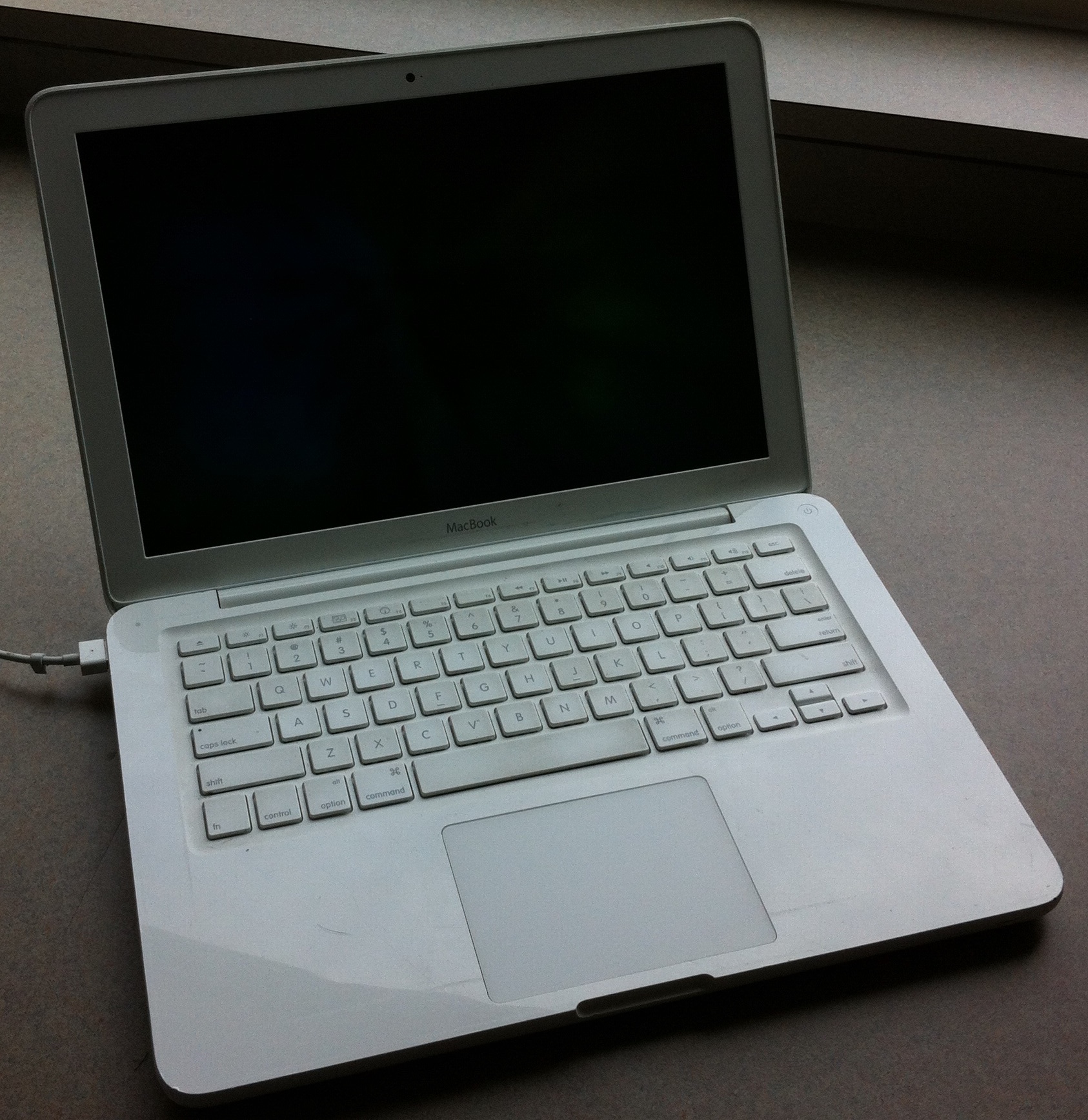
On October 20, 2009, Apple released a MacBook that had a new and more rounded polycarbonate (plastic) unibody design, faster DDR3 memory, a multi-touch trackpad, an LED-backlit display, and a built-in seven-hour battery. The polycarbonate unibody MacBook, like its aluminum predecessor, lacks FireWire and, like the 13 in MacBook Pro, has a combined audio in/out port. There is no infrared port and the Apple Remote was not included.
On May 18, 2010, the MacBook was refreshed with a faster processor, a faster graphics card, improved battery life, and the ability to pass audio through the Mini DisplayPort connector. On July 20, 2011, the MacBook was discontinued for consumer purchases, but was still available to educational institutions until February 2012. It was the last Mac to use a plastic shell, as every Mac since has used aluminum.
Design
The polycarbonate unibody MacBook is rounder on the edges than previous laptops in the MacBook line. This model has an all-white fingerprint-resistant glossy palm rest, unlike the grayish surface of its predecessor, and uses a multi-touch glass trackpad like the one found on the MacBook Pro. The video-out port is Mini DisplayPort. The bottom of the MacBook features a rubberized non-slip finish. This was prone to peeling off and Apple offered free replacements fitted by authorised agents until at least 2015 internationally. The built-in battery of the late 2009 revision, a feature introduced earlier in the year with the MacBook Pro, is claimed by Apple to last seven hours compared with five hours in the older models. However, in tests conducted by Macworld, the battery was found to last only about four hours while playing video at full brightness with AirPort turned off. However, Apple's battery life was calculated with the brightness at the middle setting and while browsing websites and editing word documents, not with video and at full brightness. Gizmodo also reached about the same conclusion in their tests, but with AirPort turned on. The battery included in the mid-2010 model holds an additional five watt-hours over the previous model's and is claimed to last up to ten hours.
Reception
Slashgear praised the polycarbonate unibody MacBook as "one of the best entry-level notebooks Apple have produced", but criticized it for its lack of a FireWire port and SD card slot. Nilay Patel of Engadget added that the USB ports were easily dented and the bottom of the laptop became worn and discolored after a few days. He also drew particular attention to the fact that the price was not lowered, stating the small price difference between the MacBook and the MacBook Pro makes it a "wasted pricing opportunity." However, most critics agree that the unibody MacBook's display is significantly better than its predecessor's. AppleInsider states the new display "delivers significantly better color and viewing angle performance" than the previous MacBook, but still "not as vivid and wide-angle viewable as the MacBook Pro screens."
Technical specifications
Models of the Macbook A1342 family
| Model | Late 2009 | Mid 2010 | Timeline | Announced | Released | Discontinued | Vintage | Obsolete | Production | Order Numbers | Model Numbers | Machine Model | Display | Performance | Front side bus | Processor | Intel Penryn-3M Core 2 Duo (P7550) | Intel Penryn-3M Core 2 Duo (P8600) | Clock speed | MemoryMemory noted are the options available from Apple. As memory is a user-replaceable part, there are custom configurations possible, including use of two 2 GB RAM modules, for 4 GB of RAM, two 4 GB RAM modules, for 8 GB of RAM, and two 8 GB RAM modules, for 16 GB of RAM. Modules must be PC3-8500S, CL 7, 1.5 volts. Also possible: 2 + 1 = 3 GB; 4 + 1 = 5 GB; 8 + 1 = 9 GB; 4 + 2 = 6 GB; 8 + 2 = 10 GB; 8 + 4 = 12 GB. Modules may be 1Rx8 or 2Rx8. | Graphics | Storage | Hard drive | SuperDrive | Connectivity | Peripherals | Camera | Video out | Operating system | Original | Latest | Battery | Dimensions | Weight | Volume |
|---|---|---|---|---|---|---|---|---|---|---|---|---|---|---|---|---|---|---|---|---|---|---|---|---|---|---|---|---|---|---|---|---|---|---|---|
| October 20, 2009 | May 18, 2010 | ||||||||||||||||||||||||||||||||||
| May 18, 2010 (May 16, 2011 to the education channel) | July 20, 2011 (February 8, 2012 to the education channel) | ||||||||||||||||||||||||||||||||||
| MC207 | MC516 | ||||||||||||||||||||||||||||||||||
| A1342 | |||||||||||||||||||||||||||||||||||
| MacBook6,1 & EMC 2350 | MacBook7,1 & EMC 2395 | ||||||||||||||||||||||||||||||||||
| 13.3 in LED backlit glossy widescreen LCD, 1280 × 800 pixel resolution | |||||||||||||||||||||||||||||||||||
| 1066 MHz | |||||||||||||||||||||||||||||||||||
| 2.26 GHz | 2.4 GHz | ||||||||||||||||||||||||||||||||||
| Two slots for PC3-8500 DDR3 SDRAM (1066 MHz) | |||||||||||||||||||||||||||||||||||
| 2 GB (two 1 GB) | |||||||||||||||||||||||||||||||||||
| Expandable to 8 GB (4 GB supported by Apple) | Expandable to 16 GB (4 GB supported by Apple) | ||||||||||||||||||||||||||||||||||
| Integrated Nvidia GeForce 9400M with 256 MB shared with main memory | |||||||||||||||||||||||||||||||||||
| (up to 512 MB available in Windows through Boot Camp) | Integrated Nvidia GeForce 320M with 256 MB shared with main memory | ||||||||||||||||||||||||||||||||||
| Serial ATA 250 GB 5400-rpm | |||||||||||||||||||||||||||||||||||
| Internal Slot-Loading | |||||||||||||||||||||||||||||||||||
| Maximum write: 8× DVD±R, 4× DVD±R DL, 4× DVD±RW, 24× CD-R, 10× CD-RW | |||||||||||||||||||||||||||||||||||
| Maximum read: 8× DVD±R, DVD-ROM, 6× DVD-ROM (double layer DVD-9), DVD±R DL, DVD±RW, 24× CD | |||||||||||||||||||||||||||||||||||
| Integrated AirPort 802.11a/b/g/n (BCM43224 chipset) | |||||||||||||||||||||||||||||||||||
| Gigabit Ethernet | |||||||||||||||||||||||||||||||||||
| Bluetooth 2.1 + EDR | |||||||||||||||||||||||||||||||||||
| 2 × USB 2.0 | |||||||||||||||||||||||||||||||||||
| 1 × Optical digital audio out / analog audio line-out/in | |||||||||||||||||||||||||||||||||||
| iSight Camera (640 × 480 0.3 MP) | |||||||||||||||||||||||||||||||||||
| Mini DisplayPort | |||||||||||||||||||||||||||||||||||
| Video only | Mini DisplayPort | ||||||||||||||||||||||||||||||||||
| with Audio-out | |||||||||||||||||||||||||||||||||||
| Mac OS X 10.6 Snow Leopard | |||||||||||||||||||||||||||||||||||
| macOS 10.13 High Sierra (Unofficially, able to go to macOS Sequoia by using a third party OS patcher) | |||||||||||||||||||||||||||||||||||
| 60-watt-hour non-removable lithium-polymer | 63.5-watt-hour non-removable lithium-polymer | ||||||||||||||||||||||||||||||||||
| 4.7 lb | |||||||||||||||||||||||||||||||||||
| 1.09 in × 13.00 in × 9.12 in (27.4 mm × 330.3 mm × 231.7 mm) |
Criticisms and defects
The rubber bottom of unibody MacBooks have been known to peel off. Apple has noticed this as a flaw and will replace the bottom for free, with or without a warranty. Some consumers have also reported defects in their LCD displays in mid-2010–2011 models.
The MagSafe power adapter of MacBooks has been known to fray, break, and stop working. Following a lawsuit, Apple replaces these adapters for US residents with affected adapters, purchased (or received as a gift) with computers or as an accessory.
Some MacBooks are affected by the iSeeYou vulnerability, potentially allowing their iSight cameras to record the user without the user's knowledge.
Supported operating systems
| Supported macOS releases | macOS release | Original | Late 2006 | Mid 2007 | Late 2007 | Early 2008 | Late 2008 (White) | Late 2008 (Aluminum) | Early 2009 | Mid 2009 | Late 2009 | Mid 2010 | 10.4 Tiger | 10.5 Leopard | 10.6 Snow Leopard | 10.7 Lion | 10.8 Mountain Lion | 10.9 Mavericks | 10.10 Yosemite | 10.11 El Capitan | 10.12 Sierra | 10.13 High Sierra | 10.14 Mojave | 10.15 Catalina | 11 Big Sur | 12 Monterey | 13 Ventura | 14 Sonoma | 15 Sequoia | 26 Tahoe |
|---|---|---|---|---|---|---|---|---|---|---|---|---|---|---|---|---|---|---|---|---|---|---|---|---|---|---|---|---|---|---|
| Partial}} | ||||||||||||||||||||||||||||||
| text=With 1 GB RAM}} | ||||||||||||||||||||||||||||||
| text=With 2 GB RAM}} | ||||||||||||||||||||||||||||||
| Patch, | ||||||||||||||||||||||||||||||
| With 2 GB RAM}} | ||||||||||||||||||||||||||||||
| Patch, | ||||||||||||||||||||||||||||||
| With 2 GB RAM}} | Patch, | |||||||||||||||||||||||||||||
| With 2 GB RAM}} | ||||||||||||||||||||||||||||||
| Patch, | ||||||||||||||||||||||||||||||
| With 2 GB RAM}} | Patch}} | |||||||||||||||||||||||||||||
| Patch}} | ||||||||||||||||||||||||||||||
| Patch}} | ||||||||||||||||||||||||||||||
| Patch, | ||||||||||||||||||||||||||||||
| With 4 GB RAM}} | Patch, | |||||||||||||||||||||||||||||
| With 4 GB RAM}} | ||||||||||||||||||||||||||||||
| Patch, | ||||||||||||||||||||||||||||||
| With 4 GB RAM}} |
| Supported Windows versions | Windows version | Original | Late 2006-Mid 2009 | Late 2009-Mid 2010 | Windows 2000 | Windows XP | Windows Vista (32-bit) | Windows Vista (64-bit) | Windows 7 (32-bit) | Windows 7 (64-bit) | Windows 8 | Windows 10 | Windows 11 | ||
|---|---|---|---|---|---|---|---|---|---|---|---|---|---|---|---|
| {{Reflist | group=Note | refs= |
Timeline
Notes
References
References
- Pierce, David. (October 30, 2013). "13-inch MacBook Pro with Retina display review (2013)". [[Vox Media]].
- (October 20, 2009). "Apple Updates MacBook With LED-Backlit Display, Multi-Touch Trackpad & Built-in Seven-Hour Battery". Apple Inc..
- Mossberg, Walter. (October 28, 2008). "Apple Polishes Popular MacBook for a Higher Price". The Wall Street Journal.
- Slivka, Eric. (July 20, 2011). "Apple discontinues white MacBook".
- Slivka, Eric. (July 20, 2011). "White MacBook Not Dead Yet: Still Available for Educational Institutions".
- Slivka, Eric. (February 8, 2012). "Apple Kills Off White MacBook as Educational Institution Distribution Halted".
- "White & Black MacBook Q&A – Revised March 1, 2008". EveryMac.com.
- (May 27, 2009). "Apple – MacBook – Technical Specifications". Apple.
- Booker, Zac. (January 9, 2008). "The Vanishing Numeric Keypad".
- (October 14, 2008). "MacBook Manuals". Apple.
- (September 8, 2008). "MacBook (13-inch): Shuts down intermittently". Apple Inc..
- "About white MacBook palmrest area". [[Apple Inc..
- "Apple model numbers".
- (October 13, 2008). "MacBook – Technical Specifications". Support.apple.com.
- (October 13, 2008). "MacBook (Late 2006) – Technical Specifications". Support.apple.com.
- (October 13, 2008). "MacBook (Mid 2007) – Technical Specifications". Support.apple.com.
- (October 13, 2008). "MacBook (Late 2007) – Technical Specifications". Support.apple.com.
- (October 13, 2008). "MacBook (Early 2008) – Technical Specifications". Support.apple.com.
- "Apple MacBook "Core 2 Duo" 2.1 13" (White-08) Specs (MB402LL/A*)". EveryMac.com.
- (January 22, 2009). "MacBook (13-inch, Early 2009) – Technical Specifications". Apple.com.
- (May 27, 2009). "MacBook (13-inch, Mid 2009) – Technical Specifications". Apple.com.
- (2006-05-16). "Press Info – Apple Unveils New MacBook Featuring Intel Core Duo Processors". Apple.
- (2006-11-08). "Press Info – Apple Unveils New MacBook With Intel Core 2 Duo Processors". Apple.
- (2007-05-15). "Press Info – Apple Updates Popular MacBook". Apple.
- (2008-02-26). "Press Info – Apple Introduces New MacBook and MacBook Pro Models". Apple.
- (2008-10-14). "Press Info – New MacBook Family Redefines Notebook Design". Apple.
- (October 24, 2008). "3GB MacBook". OtherWorldComputing.
- (February 10, 2011). "8GB RAM is not a hardware limit. It is software!". forums.macrumors.com.
- (April 12, 2007). "Mobile Intel 945 Express Chipset Family Datasheet". [[Intel]].
- "AirPort Extreme 802.11n Enabler for Mac". Apple Inc..
- "MacBook: Mini-DVI to video adapter compatibility".
- (October 9, 2008). "Apple makes October 14th MacBook event official".
- (October 14, 2008). "Apple Announces New Aluminum MacBooks". Macrumors.com.
- (June 8, 2009). "Apple Updates 13" Aluminum MacBook, Rebranded as "MacBook Pro"".
- (October 16, 2008). "Review: MacBook and MacBook Pro Dual Review". Gizmodo.
- (November 2, 2008). "Apple's unibody MacBook Review". AppleInsider.
- (October 21, 2008). "MacBook and MacBook Pro Review". Engadget.
- Sorrel, Charlie. (February 19, 2009). "Hands On: Old MacBook Pro vs New MacBook". [[Wired News]].
- Cohen, Peter. (October 7, 2008). "FireWire's MacBook absence—inconvenience or fatal flaw?". Macworld.com.
- (October 14, 2008). "MacBook (13-inch, Aluminum, Late 2008) – Technical Specifications". Apple.com.
- Weintraub, Seth. (October 20, 2008). "NVidia says new Macbook/Pro can do 8 GB of RAM". Computerworld, Inc (IDG).
- (March 3, 2011). ""Secret" Firmware lets Late '08 MacBooks use 8 GB.". Other World Computing.
- "Mac Pro – Technical Specifications".
- "Supported Models {{!".
- AppleInsider. (October 20, 2009). "Apple intros MacBook overhaul with LED display, 7-hour battery".
- (May 2017). "Apple's Last Plastic MacBook Now Considered Obsolete".
- (October 28, 2009). "Apple MacBook/2.26GHz Review". Macworld.
- "Apple – Macbook – Technical Specifications".
- (October 21, 2009). "Unibody Apple MacBook Review".
- (May 20, 2010). "Teardown of Apple's latest MacBook reveals slightly larger battery". AppleInsider.
- (October 22, 2009). "MacBook Unibody review (late 2009)". Slashgear.
- (October 22, 2009). "Unibody MacBook (late 2009) Review". Engadget.
- (October 30, 2009). "Review: Apple's redesigned, late 2009 13-inch MacBook". AppleInsider.
- (October 20, 2009). "MacBook (13-inch, Late 2009) – Technical Specifications". Apple.com.
- (May 18, 2010). "MacBook (13-inch, Mid 2010) – Technical Specifications". Apple.com.
- (2009-10-20). "Press Info – Apple Updates MacBook With LED-Backlit Display, Multi-Touch Trackpad & Built-in Seven-Hour Battery". Apple.
- "Apple, Inc. Education Price List May 16, 2011".
- "MacBook Core 2 Duo 2.4 13 (Mid-2010) Specs".
- (December 27, 2012). "OWC Announces Max RAM Memory Upgrades to 16 GB for 2010 Mac Mini, MacBook and MacBook Pro".
- "Supported Models Opencore".
- (May 7, 2011). "Review: Apple's redesigned, late 2009 13-inch MacBook". Apple.
- "About Apple's Power Adapter Replacement Program --- US Only".
- "Magsafe Power Adapter Settlement Frequently Asked Questions".
- Soltani, Ashkan. (2013-12-18). "Research shows how MacBook Webcams can spy on their users without warning". [[The Washington Post]].
- Peckham, Matt. (2013-12-20). "Miss Teen USA's Webcam Hacked".
- Requires at least 10.4.9 due to 64-bit EFI. No graphics acceleration are available for the GMA X3100.
- Screen brightness control and audio input/output will not work. Display color profile and some trackpad settings will also be unavailable. Screenshots will not be rendered properly, causing image corruption.
- NVDAResman.kext needs to be deleted. Graphics acceleration and audio input/output will not work. Display color profile, display brightness and some trackpad settings will also be unavailable.
- Requires system files patching. Up to 10.7.3 or 10.7.5 with no Wi-Fi.
- There are no graphics drivers available for the GMA 950 after OS X Mountain Lion.
- There are no graphics drivers available for the GMA X3100 after OS X Mountain Lion.
- Although bootable, macOS Big Sur and later does not have any drivers for the internal keyboard, trackpad and USB ports. The GMA X3100 also has no drivers since OS X Mountain Lion, making the system unusable. No patcher supports this model.
- (March 10, 2015). "System requirements to install Windows on your Mac via Boot Camp".
- Keizer, Gregg. (August 2, 2011). "OS X Lion requires Windows 7 for Boot Camp".
- Hu, Jonathan. (August 12, 2015). "Apple Released Boot Camp 6.1 with Windows 10 Support".
- (December 6, 2018). "System requirements to install Windows using Boot Camp for macOS".
- Windows XP can only be installed on Macs with Boot Camp 3 or earlier. This includes Mac OS X 10.6 or earlier and copies of Mac OS X 10.7 that have not been updated to Boot Camp 4.
- Windows Vista can only be installed on Macs with Boot Camp 3 or earlier. This includes Mac OS X 10.6 or earlier and copies of Mac OS X 10.7 that have not been updated to Boot Camp 4.
- The 32-bit version of Windows 7 can only be installed on Macs with Boot Camp 3.1 to 6.0. This includes OS X 10.11 and earlier.
- The 64-bit version of Windows 7 can only be installed on Macs with Boot Camp 3.1 or later, running macOS High Sierra or earlier. Later versions of macOS no longer support Windows 7.
- This version of Windows is not supported with Boot Camp on these Macs. Later versions of Windows can be installed via Windows in-place upgrade.
- This version of Windows is not supported on these Macs however, these can still be unofficially installed.
This article was imported from Wikipedia and is available under the Creative Commons Attribution-ShareAlike 4.0 License. Content has been adapted to SurfDoc format. Original contributors can be found on the article history page.
Ask Mako anything about MacBook (2006–2012) — get instant answers, deeper analysis, and related topics.
Research with MakoFree with your Surf account
Create a free account to save articles, ask Mako questions, and organize your research.
Sign up freeThis content may have been generated or modified by AI. CloudSurf Software LLC is not responsible for the accuracy, completeness, or reliability of AI-generated content. Always verify important information from primary sources.
Report